Built to be played.
Synthesizers and effects with the soul of hardware and the speed of software. Find a sound in seconds, then lose an afternoon exploring it.
Five instruments. One way of playing.
Drag CHIPS, our exclusive drag-and-drop modulation, onto any parameter. Map any controller to anything. Roll a brand-new sound in one click. Learn one Sequoia instrument and you already know them all.
Pick the set for the work you do.
Each bundle gathers the Sequoia plugins made for one kind of work. Start with your set and add the rest whenever you like.
Tell us what you want to make.
- Design evolving synth sounds, leads and padsAURA-8
- Turn my own samples into a playable instrumentTENFOLD
- Build drum grooves from my sample libraryFURROW
- Age, crush and warm up any soundSILTH
- Put sounds in deep, moving spaceDEEPFIELD
- Clear up a crowded mix and master itCLEARING
- Make a track bigger, warmer and louderEMBER
- Play struck, plucked and bowed resonancesRESONA
Real sound. Real moves.
Every knob you see turning shapes the sound you hear. Turn the sound on and press play.
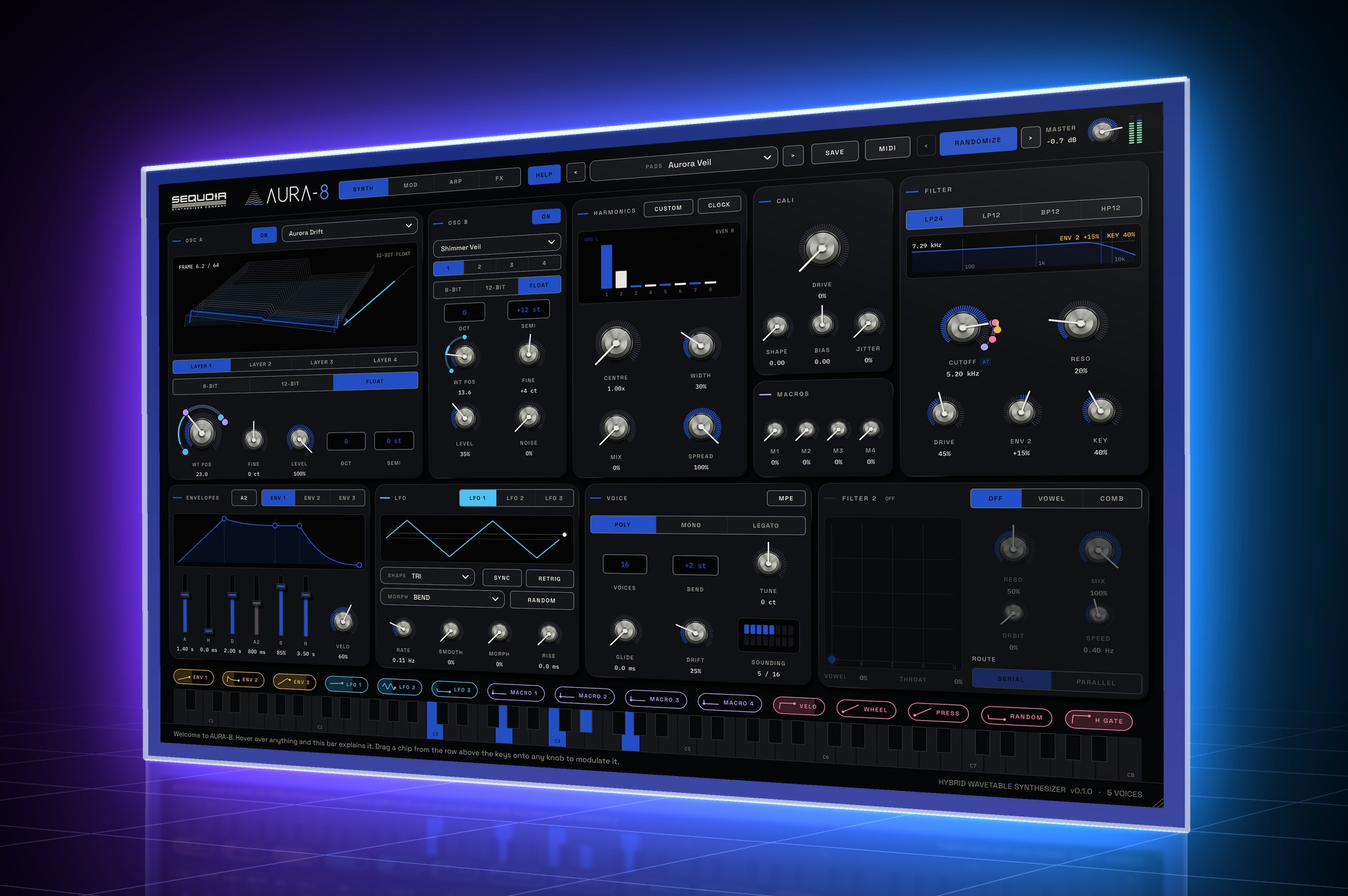
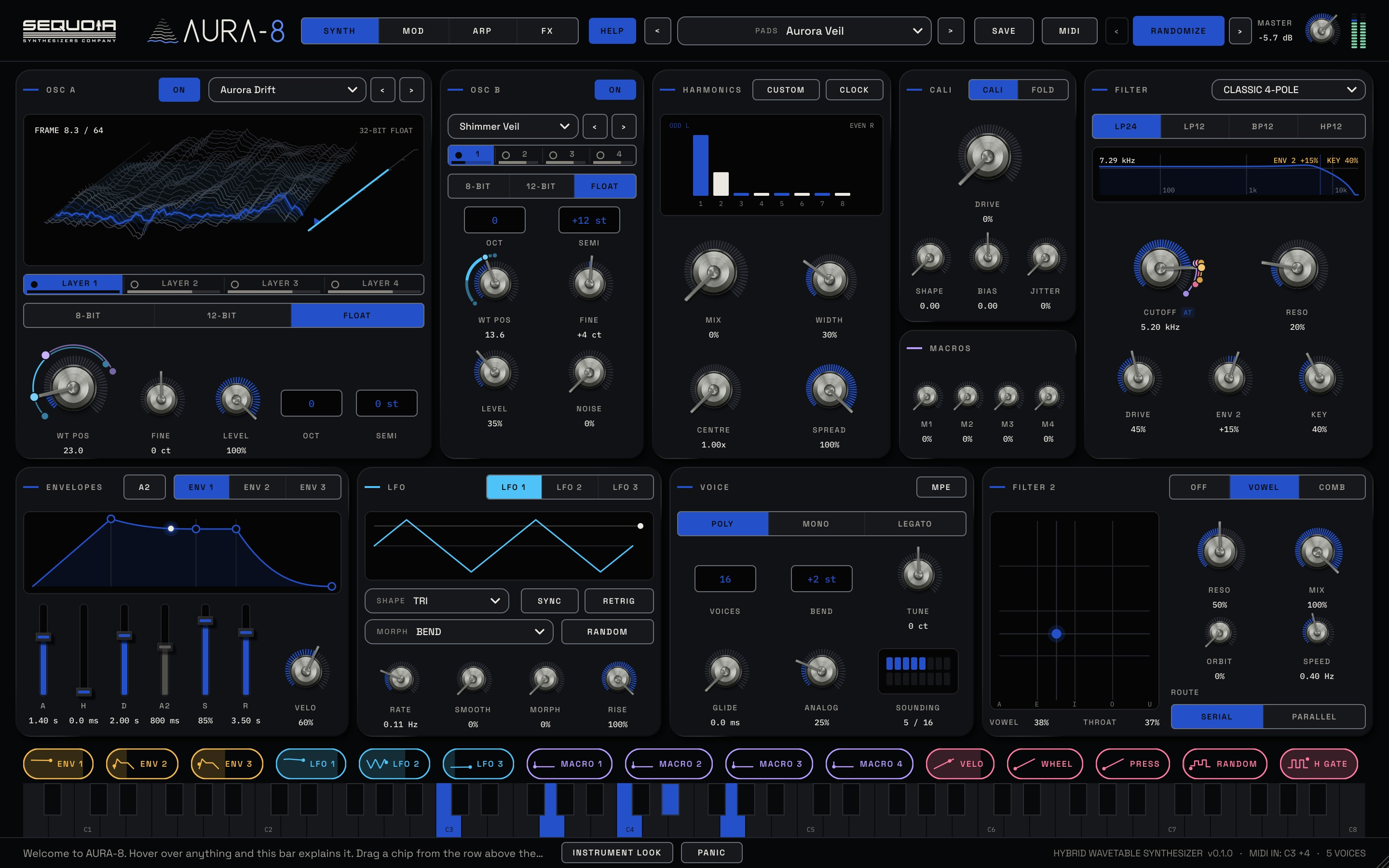
Wavetables with an analog heart. Two oscillators, eight harmonics, a transistor wave folder and an arpeggiator that can lock into a steady pattern or bring it to life with movement and change. Drag CHIPS, Sequoia's exclusive drag-and-drop modulation, onto any parameter and watch the sound come alive. Deep inside, simple on top.
PLAY
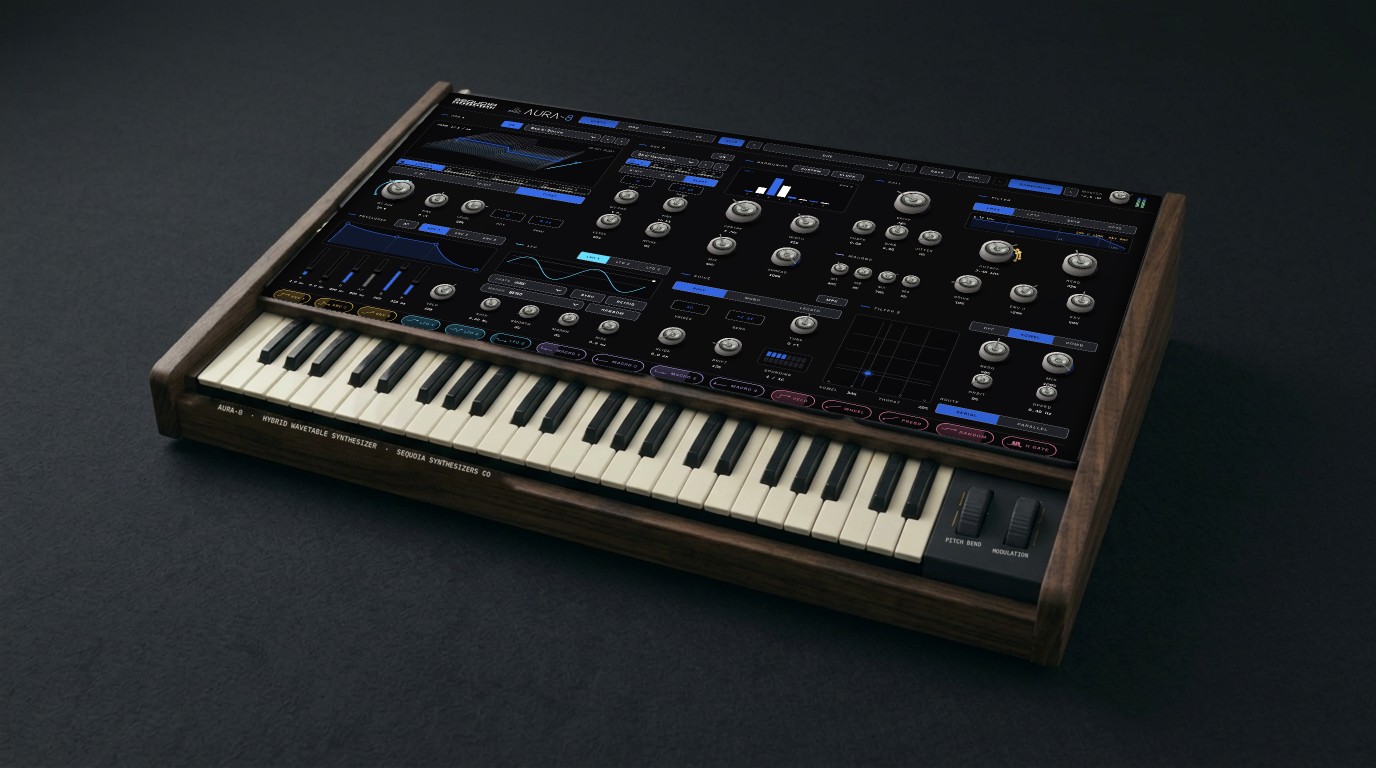
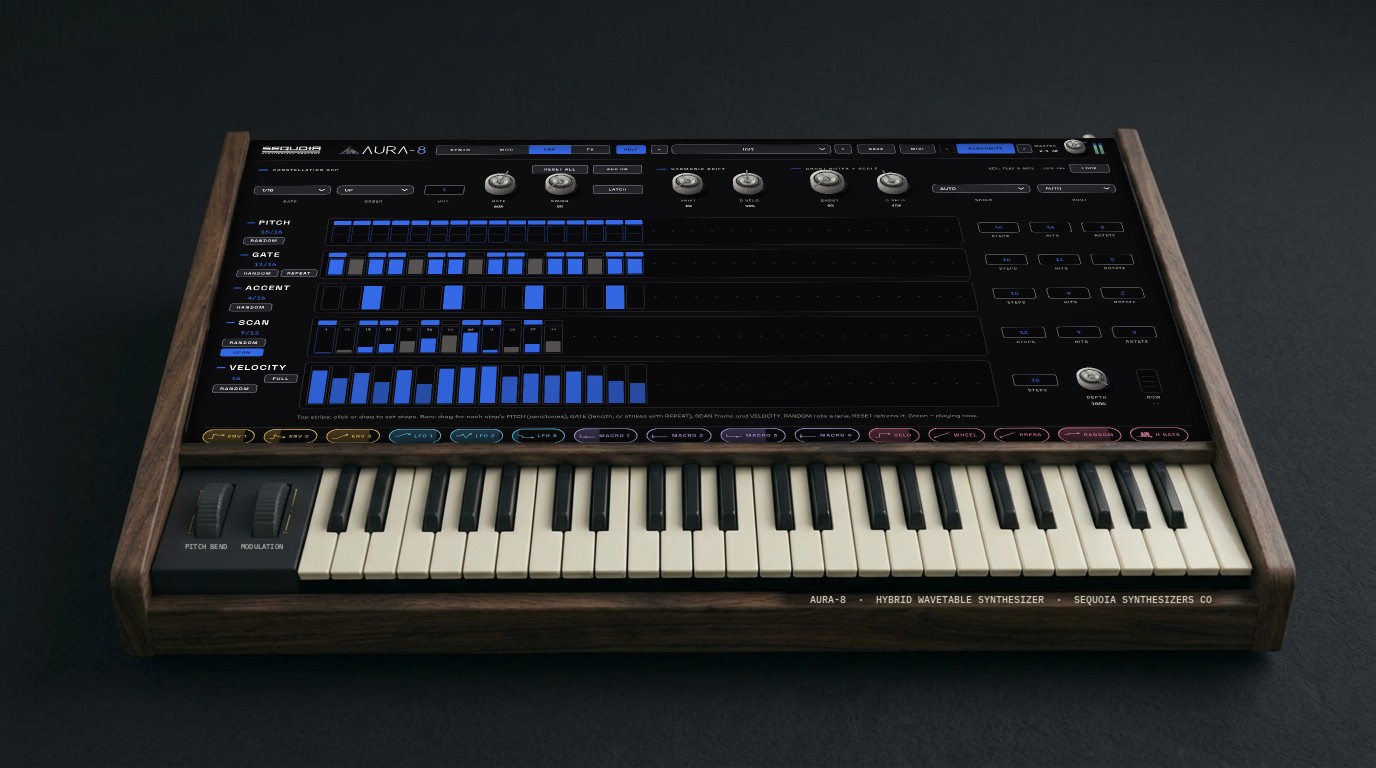
200 factory sounds in 11 categories, four performance macros, and RANDOMIZE for a new patch in one click, with BACK to every sound you had. Play it on the flat STUDIO panel or the walnut INSTRUMENT, with its own keys and wheels.
SHAPE
100 wavetables in 10 families, or drop any audio file in to make your own. Then the ERA engine, eight harmonic taps, the CALI folder and two filters.
MOVE
Drag a CHIP, Sequoia's exclusive drag-and-drop modulation, onto any parameter. Map any controller to anything with MIDI MAP. Let the Constellation arpeggiator drift five lanes against each other, in the key your song is in. MPE ready.
Oscillators
- Two wavetable oscillators plus noise
- 100 wavetables in 10 families, 64 frames each
- Drop any audio file to make a playable wavetable
- Four layers per oscillator: switch, mute and balance them from the tabs
- Step through wavetables with the arrows beside the menu
- ERA: 8-bit crunch, 12-bit sparkle or pristine float
Harmonics & folding
- Eight harmonic taps with CENTRE, WIDTH and SPREAD
- Draw every harmonic by hand with CUSTOM
- CLOCK turns the taps into rhythmic gates
- CALI transistor wave folder with JITTER
- WEST FOLD: a West-coast folder (sine, triangle, two-stage, soft), before or after the filters
Filters
- Nine filter models: CLASSIC 4-POLE, CLEAN SVF, LADDER, MORPH 12, CASCADE 24, BRIGHT 24, DIODE, SCREAM, WILD 12
- Each in LP24, LP12, BP12 or HP12, switching without a click
- Second filter: VOWEL (A-E-I-O-U) or tuned COMB
- Serial or parallel
Modulation
- Three AHDSR envelopes you shape by dragging the curve
- Three LFOs, free or synced
- CHIPS: exclusive drag-and-drop modulation onto any parameter, with live arcs
- 24 routings on the MOD page, four performance macros
Play & MIDI
- 16 voices: poly, mono or legato, with glide and analog drift
- MPE support
- MIDI MAP: any wheel, pedal or CC moves any control
- Constellation arpeggiator: five lanes, ghost notes, harmonic drift
- Key AUTO listens to your song and keeps the arp in its key
- MIDI IN readout and a one-click PANIC
Effects
- WINDSHEAR pitch pedal and GERMANIUM saturation
- Vintage OPTO / FET compressor
- Chorus, flanger and resonator (bucket-brigade)
- Grain, spectral freeze and triple-head tape echo
- FOCUS display shows the effect you last touched
- FX LEVEL: AUTO holds your level steady, plus ±12 dB GAIN
Two looks
- STUDIO: the flat dark Signal panel
- INSTRUMENT: walnut case, 61 keys and brass lights
- Pitch and mod wheels that follow your controller
- Switch any time; it remembers your choice
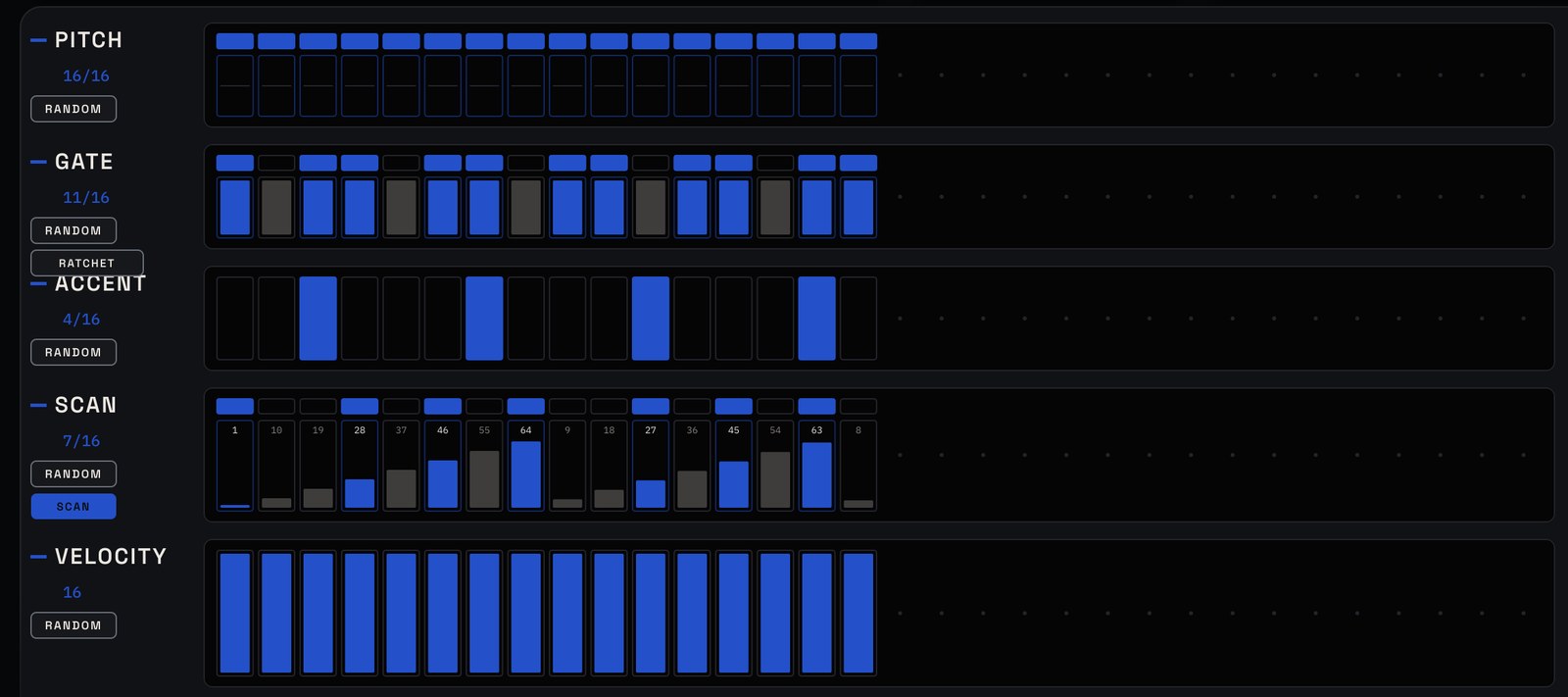
An arpeggiator with five minds.
Play a pattern that repeats exactly, or give PITCH, GATE, ACCENT, SCAN and VELOCITY their own lengths and let the pattern move and change as it plays. Ghost notes, harmonic drift and key AUTO keep it in the key of your song.
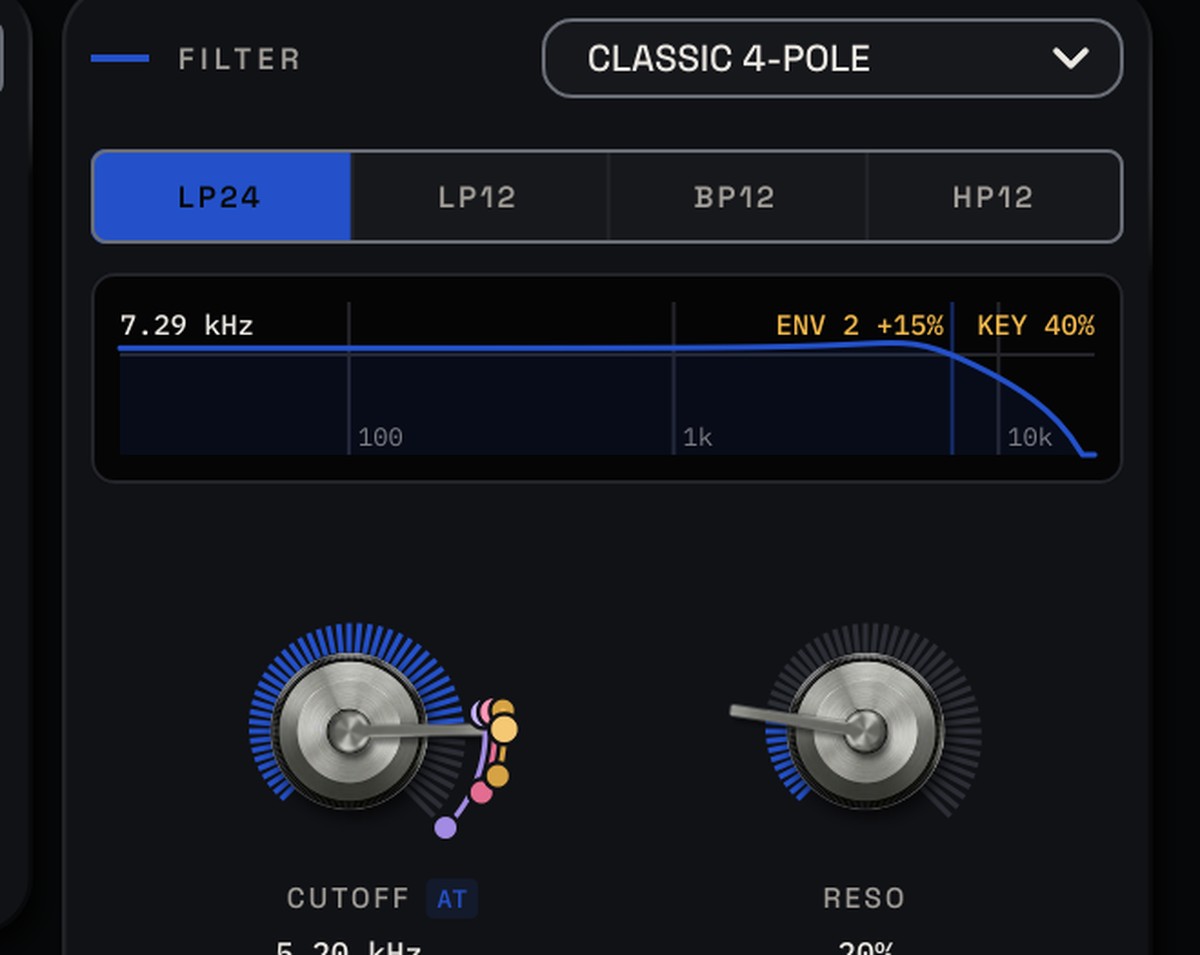
CHIPS: drag movement onto any parameter.
CHIPS are Sequoia's exclusive drag-and-drop modulation. Pick up an envelope, LFO, macro or your mod wheel and drop it on any parameter. Its arc shows exactly how far it moves, live, while you play.
- 200 factory presets and 100 wavetables
- VST3, AU, CLAP and a standalone app
- Mac and Windows
- Quick guide, plus a help bar that explains every control
- Free updates for as long as you own it
What do I need to run AURA-8?
A Mac with macOS 10.15 or later (Apple Silicon or Intel), or a 64-bit Windows 10 or 11 PC, and any DAW that loads VST3, AU or CLAP. There's also a standalone app.
Can I make my own wavetables?
Yes. Drop any audio file on the wavetable display and AURA-8 turns it into a playable 64-frame wavetable.
Will my MIDI controller work?
Yes. Open MIDI MAP, pick the mod wheel, aftertouch, a pedal or any CC (or press LEARN and move a knob), then add every control it should move. Each one gets its own depth. AURA-8 also supports MPE.
Does the arpeggiator stay in time with my song?
Yes. When your DAW plays, the Constellation locks to the song's beat grid and restarts cleanly, and loops repeat identically. LATCH is there for auditioning when the song is stopped.
Does the arpeggiator know what key my song is in?
Set ROOT and SCALE to AUTO. No DAW tells a plugin its key, so AURA-8 listens to the notes it's played and settles on the key that fits. Until it has heard enough, it follows the notes you hold. Pick a key yourself any time.
Can I change how AURA-8 looks?
Yes. Press the LOOK button at the bottom to switch between STUDIO, the flat dark panel, and INSTRUMENT, with a walnut case, 61 keys and pitch and mod wheels. It remembers your choice.
Do updates cost extra?
No. Every update is free for as long as you own the plugin. Only a completely rebuilt new version would ever be a paid upgrade, and owners would get a discount on it.
Where are my own presets saved?
In Music / Sequoia Synthesizers / AURA-8 / Presets on a Mac, or Documents\Sequoia Synthesizers\AURA-8\Presets on Windows.
| Formats | VST3, AU, CLAP and a standalone app |
|---|---|
| Mac | macOS 10.15 or later, Apple Silicon and Intel |
| Windows | Windows 10 or 11, 64-bit |
| Works in | Any DAW that loads VST3, AU or CLAP |
| Voices | Up to 16, poly / mono / legato, with MPE and polyphonic aftertouch |
| Looks | STUDIO and INSTRUMENT (walnut case, 61 keys, pitch and mod wheels) |
| Content | 200 factory presets in 11 categories, 100 wavetables in 10 families |
| Manual | PDF and quick guide, with the download |
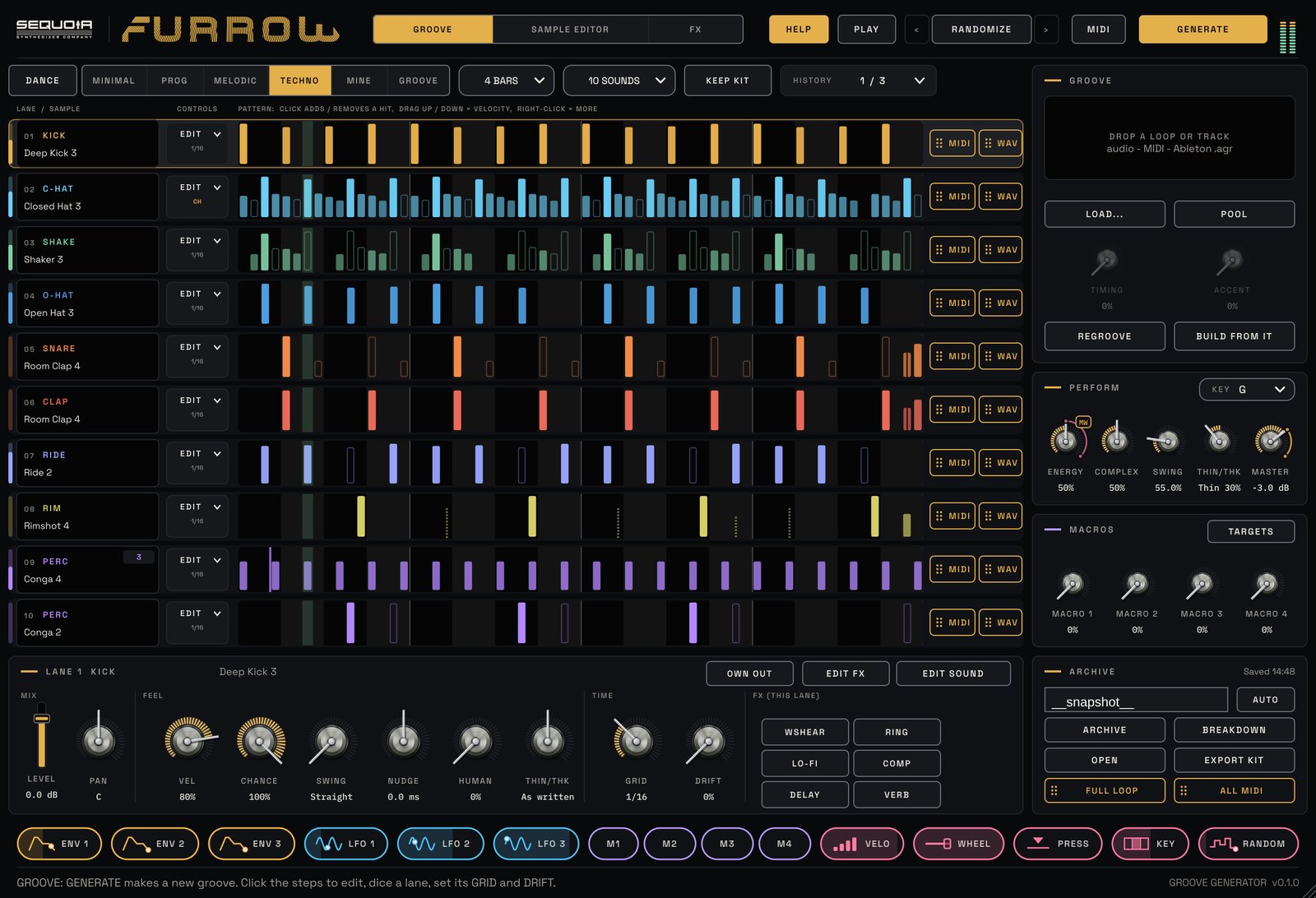
Grooves that learn you. Point FURROW at your sample library and it picks the sounds for you, choosing kicks, hats and percussion from your own folders at random, or drop in the exact samples you want. Pick a style and press GENERATE. FURROW writes the rhythm, makes it breathe from intro to peak, and gets closer to the way you write every time you use it.
PLAY
Press GENERATE. Lock the lanes you like and keep generating around them. ENERGY morphs the groove from intro to peak; automate it across your track.
SHAPE
Ten lanes, each with its own sample, grid, drift, filter and its own effects: WINDSHEAR pitch, ring mod, lo-fi, compressor, delay and reverb.
MOVE
Drag the full loop, the MIDI, or any lane's stem straight into your DAW. Or give every lane its own output. Nothing is lost: every groove goes to the ARCHIVE.
FURROW starts with a set of genre styles built for this first release. That's where it begins, not where it ends. Choose a genre you work in, and as you generate, keep and edit grooves, FURROW builds on them, shaping more refined, more focused grooves for that style. And if your sound doesn't fit any genre, choose MINE and build a style that is all your own. The longer you use it, the more it sounds like your music.
Your library
- Scans your sample folders and sorts every file by itself
- Keeps bass, synth and full-mix files out of the kit
- LOOP SLICER cuts any drum loop at every hit
- A built-in kit for the first minute
Deep roots. Your branches.
- A starting set for the first release: MINIMAL, PROG, MELODIC, TECHNO, HARDGROOVE
- Pick a genre and FURROW builds on it, refining its grooves toward that sound
- Your sound doesn't fit a genre? Choose MINE and build your own style
- GROOVE: built from any loop you drop in
- Everything it learns stays on your computer
Editing
- Dice a lane's pattern or its sound, lock, mute, solo
- THIN / THICK by bar range, polymeter lanes
- REGROOVE snaps rough edits tight to the feel
- HISTORY of the last 10 grooves, lane by lane
Feel
- Steal the push, pull and accents of any loop, MIDI file or groove template
- ENERGY, COMPLEX, MPC-style SWING
- KEY tunes every kick and tom to your track
Getting it out
- Drag FULL LOOP, ALL MIDI, or any lane's MIDI or WAV
- Main out plus 10 stereo lane outputs
- ARCHIVE: full loop, stems, breakdowns and MIDI for every groove
- EXPORT PACK turns your grooves into a sample pack
Modulation & MIDI
- ENV and LFO chips that trigger on beats, bars or a lane's hits
- RANDOM on every 16th
- MIDI MAP for any controller
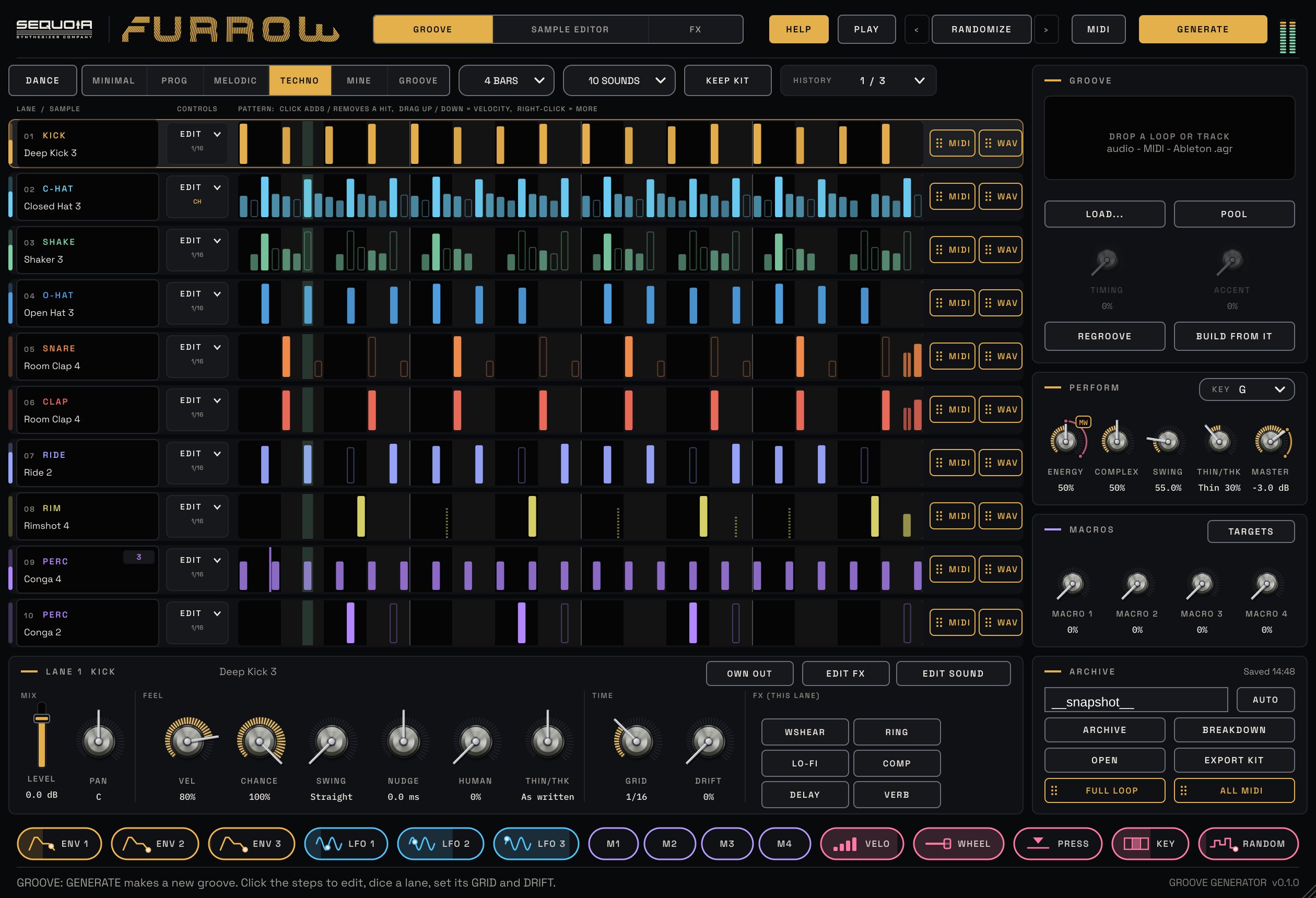
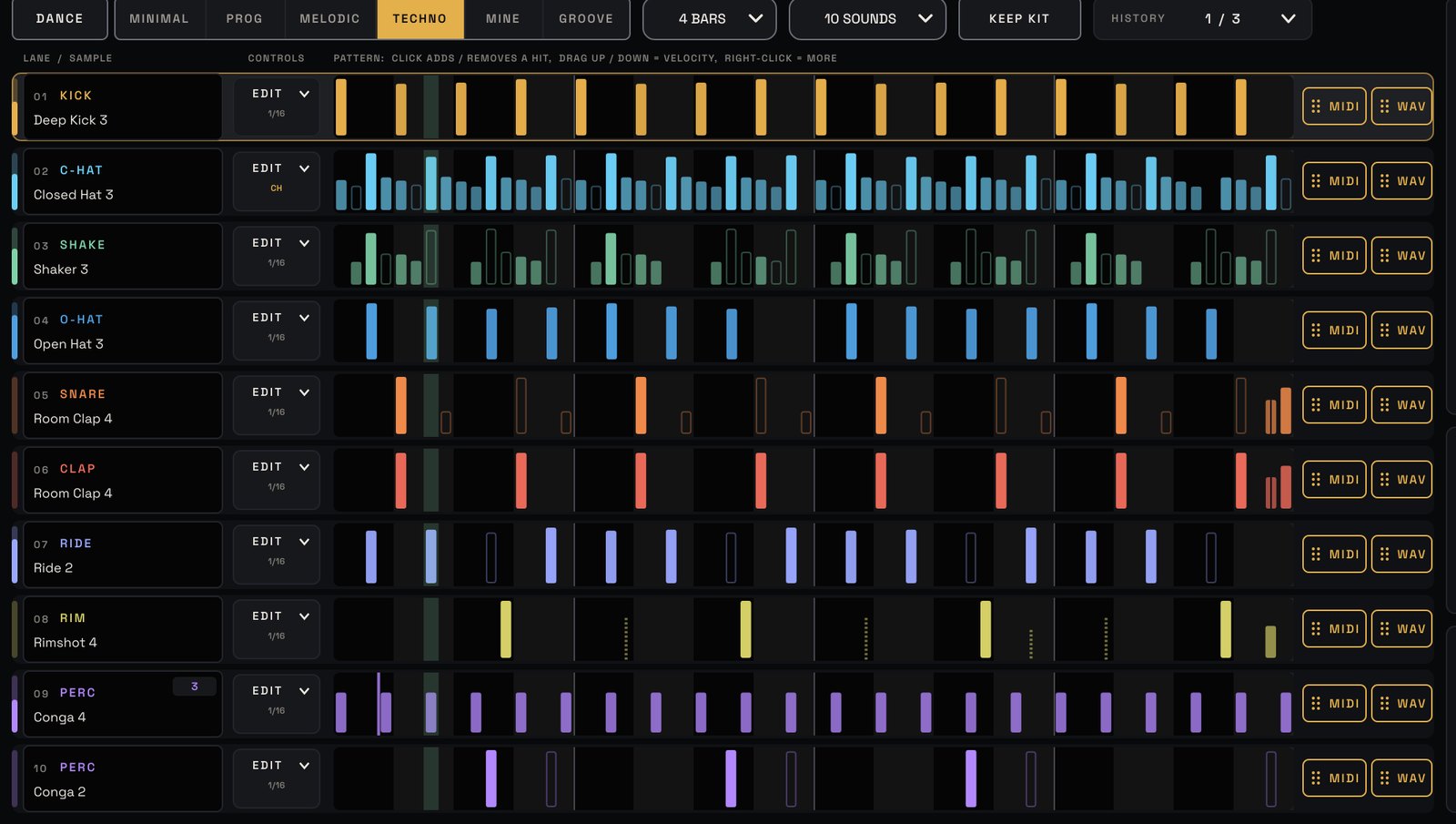
A new groove in one click.
Pick a style, press GENERATE and FURROW writes a groove across ten lanes. Edit any hit, dice a lane, and drag it all into your song.

Feel, not just notes.
Velocity, chance, swing, nudge, human timing and drift on every lane, so the groove breathes.
- Grooves in seven styles
- VST3, AU, CLAP and a standalone app
- Mac and Windows
- Export WAV and MIDI
- Free updates for as long as you own it
Does FURROW come with sounds?
It plays a built-in kit until you point it at your own sample folders. Then it uses your sounds, sorted automatically.
What does "it learns you" mean?
Every time you drag a groove into your DAW, archive it or regroove it, FURROW learns your step habits, accents, timing and swing. The MINE style then writes in that language. It all stays on your computer.
Can I use the grooves as audio and MIDI?
Both. Drag the full loop, the MIDI, or any single lane as MIDI or WAV onto a track, or switch on OWN OUT to give a lane its own output.
| Formats | VST3, AU, CLAP and a standalone app |
|---|---|
| Systems | Mac (Apple Silicon and Intel) and Windows |
| Type | Instrument / MIDI generator with multi-out |
| Outputs | Main stereo + 10 stereo lane outputs |
Clear the mix. Move the partials. CLEARING is a mastering equalizer with smooth, analog-shaped curves and no latency, a live spectrum you can freeze, and HIGHLIGHT: drag across the part that sounds crowded, press OK, and CLEARING builds the fix. Dynamic bands duck the bass under the kick, and a 48-band spectral sequencer moves the partials of your mix in time, so the whole spectrum grooves.
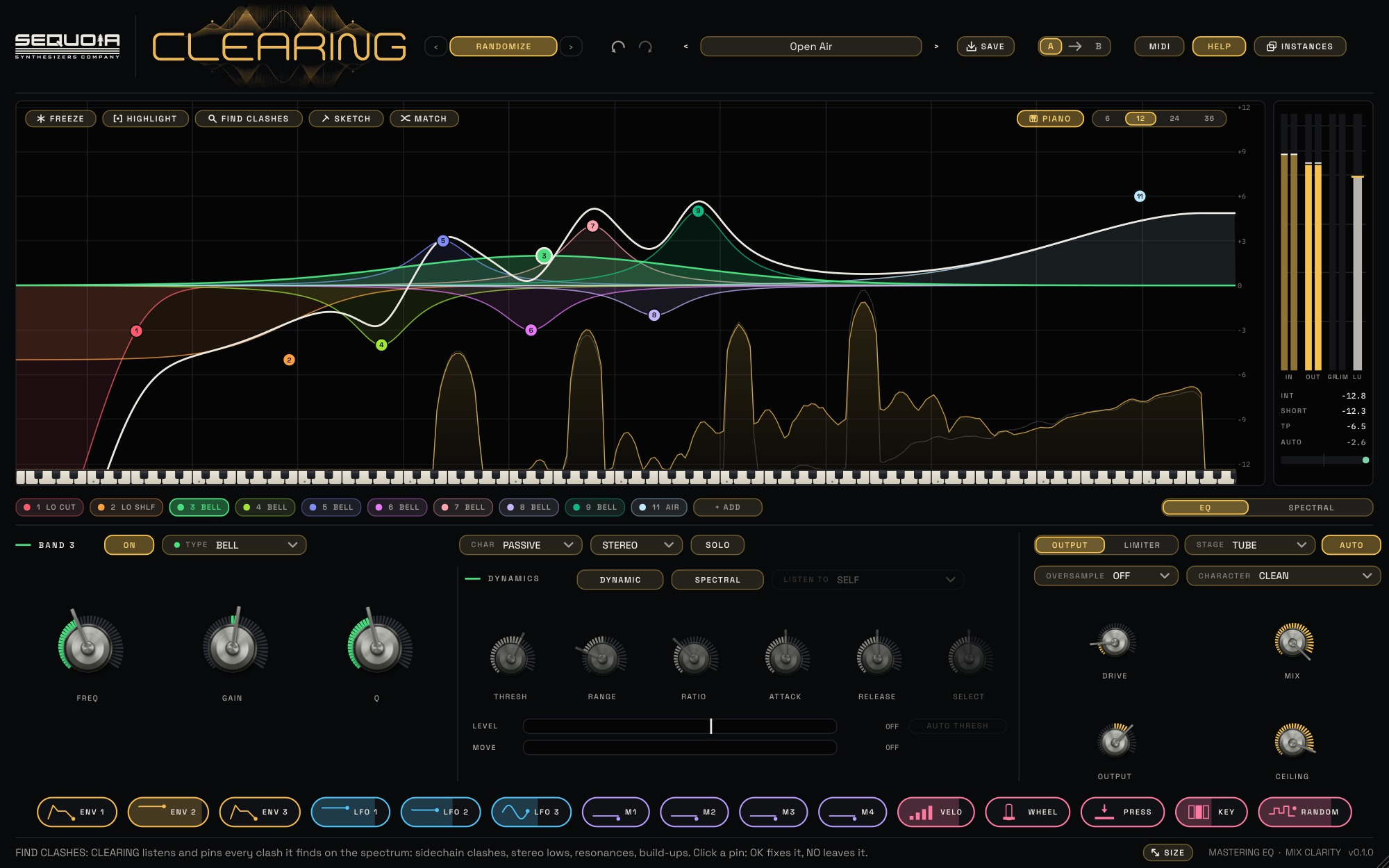
PLAY
Put it on a track or the mix bus and press play. Click any curve to add a band and pull it into place. AUTO keeps the level steady, so you judge the tone, not the volume, and A / B compares two settings.
SHAPE
24 bands with ten shapes, each in its own colour. CLEAN, PASSIVE, TUBE or IRON character per band, MID / SIDE per band, and a TUBE or IRON output stage with DRIVE.
MOVE
Dynamic bands that listen to themselves or the sidechain, the SPECTRAL step sequencer, and the full Sequoia modulation set: drag a chip onto any knob.
The EQ
- 24 bands: bell, shelves, cuts (6 to 96 dB/oct), notch, band pass, tilt, air, all-pass
- True analog curves to the top of the spectrum, zero latency
- CLEAN, PASSIVE, TUBE and IRON character on every band
- Stereo, left, right, MID or SIDE per band, with SOLO
- EQ SKETCH: draw a curve, CLEARING places the bands
- CHARACTER for the whole EQ: CLEAN, SUBTLE or WARM
- PIANO display: the frequency scale as a keyboard
Find and fix
- HIGHLIGHT finds sidechain clashes, stereo lows, resonances and build-ups
- LISTEN to just that area, OK adds the fix
- Dynamic bands with THRESH, RANGE, RATIO, ATTACK and RELEASE
- Self or sidechain, with LEVEL and MOVE meters
- AUTO THRESH follows each band's usual level
- SPECTRAL dynamics: only the narrow, ringing peaks
- PEAK GRAB: click a peak in the analyzer for a band on it
- EQ MATCH to a reference file or the sidechain
SPECTRAL sequencer
- 48 bands, SPECTRUM or HARMONIC (in key)
- 9 patterns, or DRAW your own partials
- 1/64 to 4 bars, dotted and triplet, with SWING
- MORPH, FOCUS, DEPTH, BOOST and MIX
Output and meters
- TUBE or IRON stage with DRIVE, AUTO level, MIX, OUTPUT
- SAFE ceiling: a soft clipper that no peak passes
- LUFS momentary, short-term and integrated, 4x true peak
- Stereo correlation, 2x and 4x oversampling
Workflow
- A / B compare, undo and redo
- Resizable window, 75% to 200%
- Preset browser with tags and favourites
- INSTANCES: every CLEARING in your song in one window, with copy and paste
- ALL TRACKS: see every track's sound and curve on one display, in its own colour, and adjust them from there
- 32 factory presets
- VST3, AU and CLAP
- Mac and Windows
- Help bar that explains every control
- Free updates for as long as you own it
- HIGHLIGHT step by step
- Sidechain ducking, made simple
- Mastering and mix-bus recipes
Is it for mixing or mastering?
Both. Use it on a single track to make room for other sounds, or on the mix bus for broad, analog-style tone shaping with LUFS and true-peak metering.
How do I duck the bass under the kick?
Put CLEARING on the bass and send the kick to its sidechain. Turn on DYNAMIC on a band at the kick's frequency and set LISTEN TO to SIDECHAIN, or let HIGHLIGHT build it for you. The bass dips only while the kick plays.
Does it add latency?
No. With OVERSAMPLE off, CLEARING adds no delay at all, so it is safe on any track while you record.
| Formats | Mac: VST3, AU and CLAP · Windows: VST3 and CLAP |
|---|---|
| Systems | Mac (Apple Silicon and Intel) and Windows |
| Type | Audio effect: mono, stereo, sidechain |
| Bands | 24, plus a 48-band spectral sequencer |
| Latency | None (oversampling off) |
| Presets | 32 factory presets |
| Window | 1440 × 900, resizable |
Your sounds, ten deep. Stack up to ten of your own samples on every note, run them through classic analog filters and turn any of them into a cloud of grains. Any sample, made to sound like an instrument.
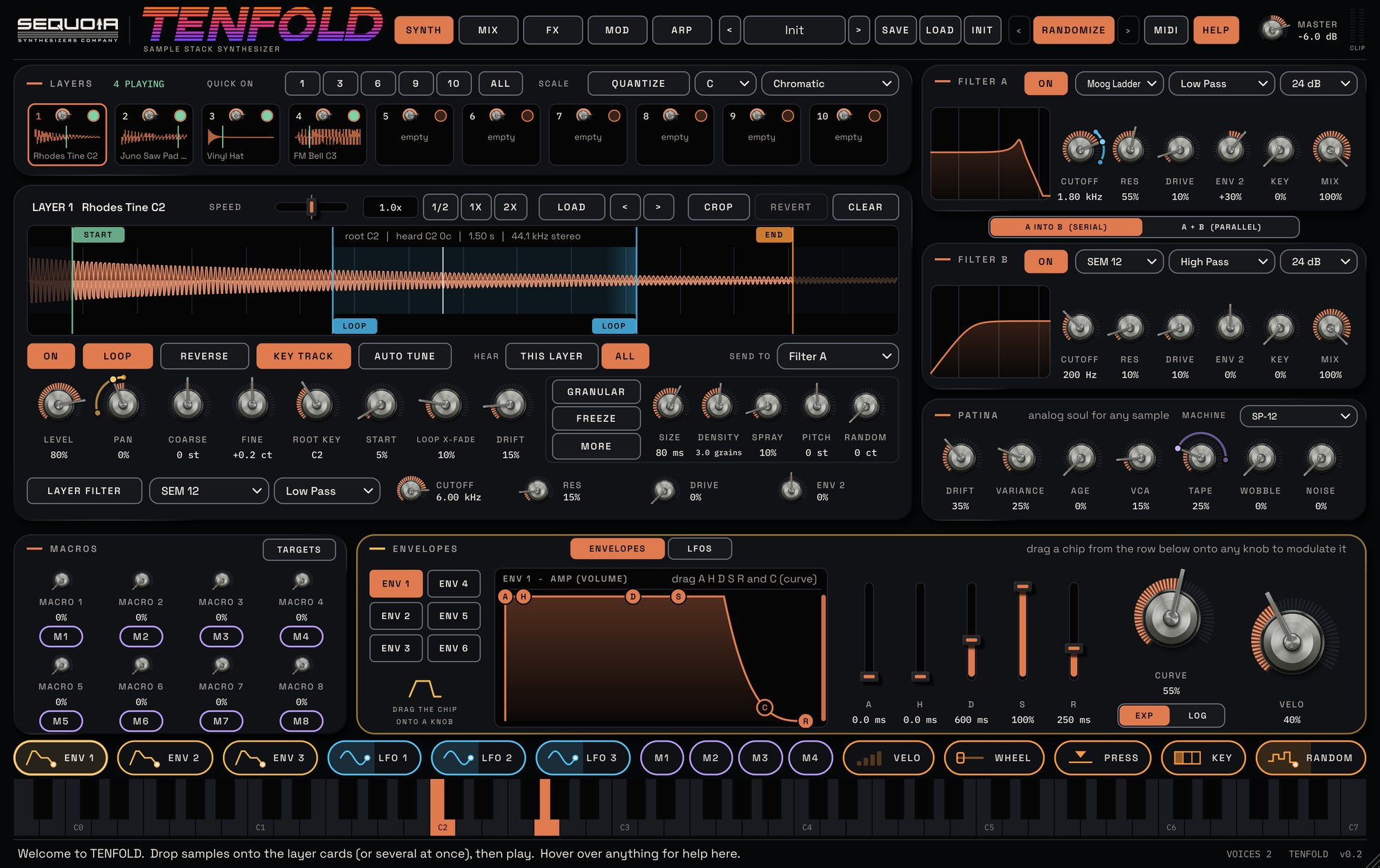
PLAY
100 factory sounds in 10 categories that reshape whatever samples you load. Hover over anything and the help bar explains it.
SHAPE
Ten layers, each with its own start, loop, speed, filter and granular engine. SEM, OB-X, ARP 4072 and Moog ladder filters. PATINA makes any sample sound analog.
MOVE
Six envelopes and six LFOs as CHIPS, our exclusive drag-and-drop modulation onto any parameter, a step arpeggiator with five lanes, a scale quantizer and MIDI MAP.
Layers
- Up to 10 samples per note, dropped straight onto a card
- START, END and LOOP markers, CROP and REVERT
- SPEED changes time without changing pitch
- AUTO TUNE reads each sample's pitch
Granular
- A granular engine on every layer
- SIZE, DENSITY, SPRAY, PITCH, RANDOM
- FREEZE to scrub, five grain shapes, reverse and width
Filters & PATINA
- Filters A and B: SEM 12, OB-X 24, ARP 4072, Moog Ladder
- Serial or parallel, plus a filter per layer
- PATINA: drift, variance, vintage sampler converters, VCA, tape, wobble, noise
Modulation & MIDI
- 6 envelopes and 6 LFOs
- CHIPS: exclusive drag-and-drop modulation onto any parameter, plus a 32-slot matrix
- MIDI MAP for any controller
- SCALE quantize for what you play and the arp
Mix, FX & Arp
- Mixer with level, pan, solo and routing for all 10 layers
- 8 stackable effect slots: drive, chorus, phaser, flanger, delay, reverb, compressors, EQ, lo-fi
- Arp with velocity, gate, pitch, glide and pan lanes, and your own saved scales
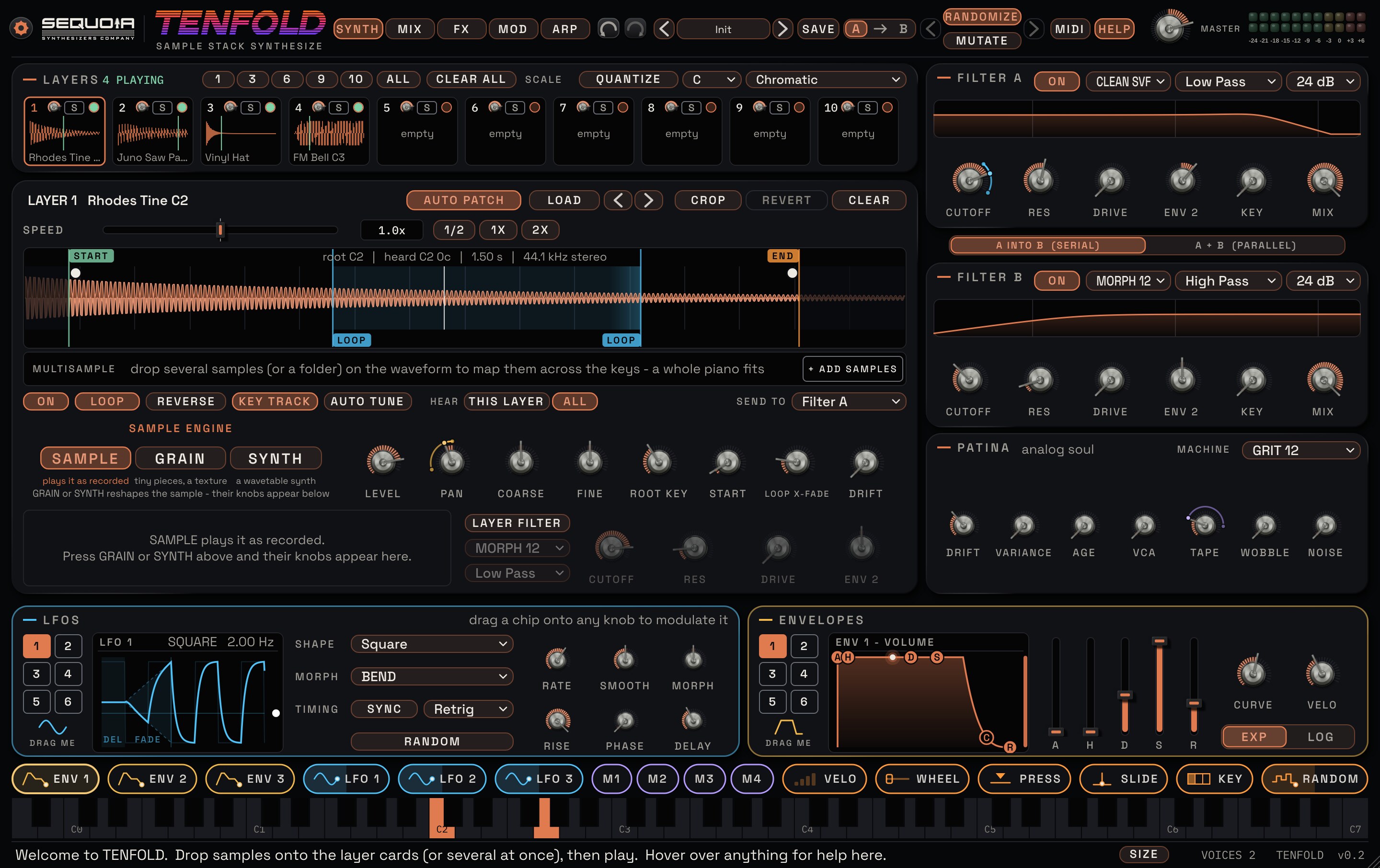
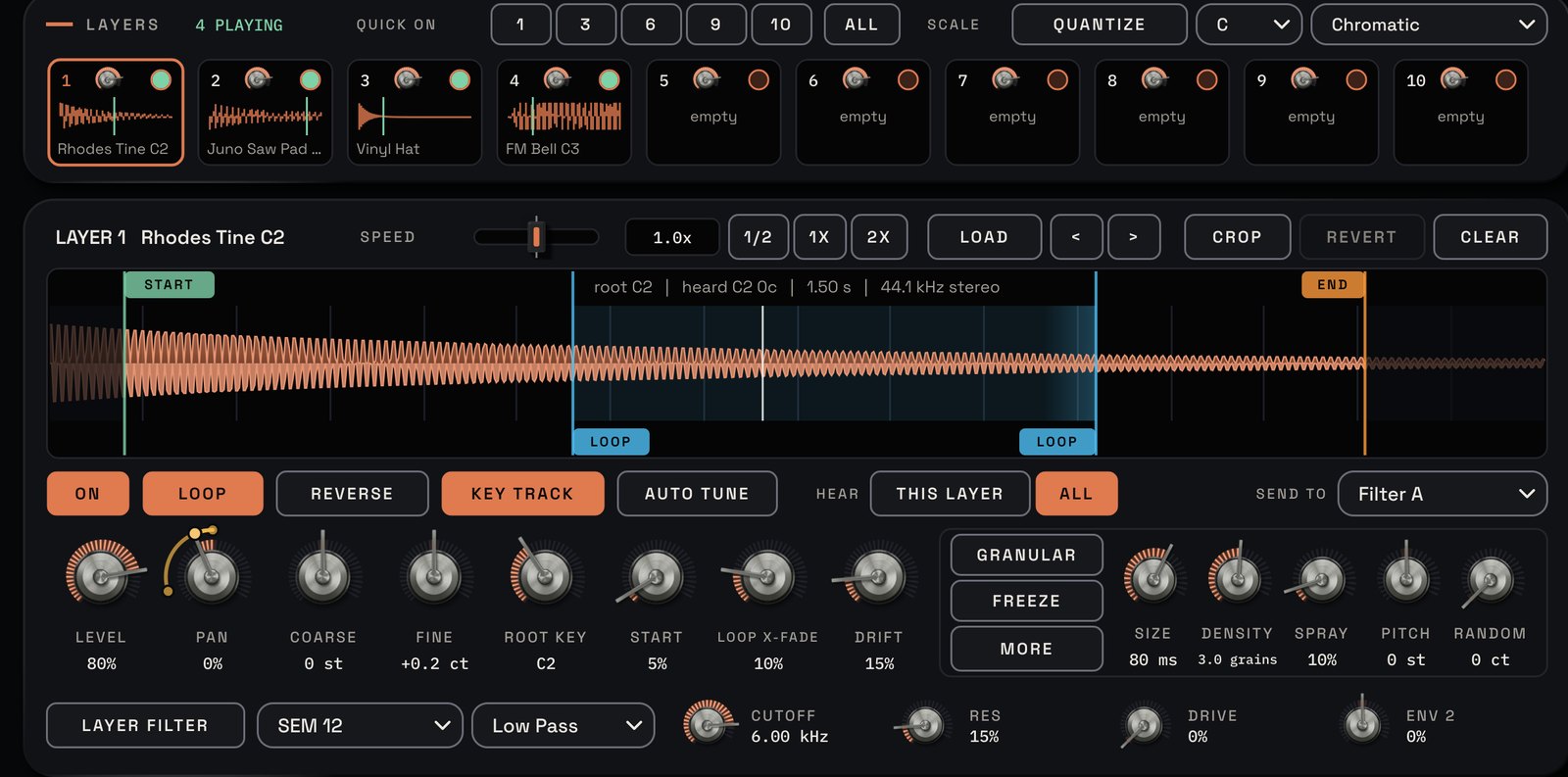
Ten samples on every note.
Drop your own sounds onto the cards and they play together as one instrument. Each layer gets its own start, loop, speed, filter and granular engine.
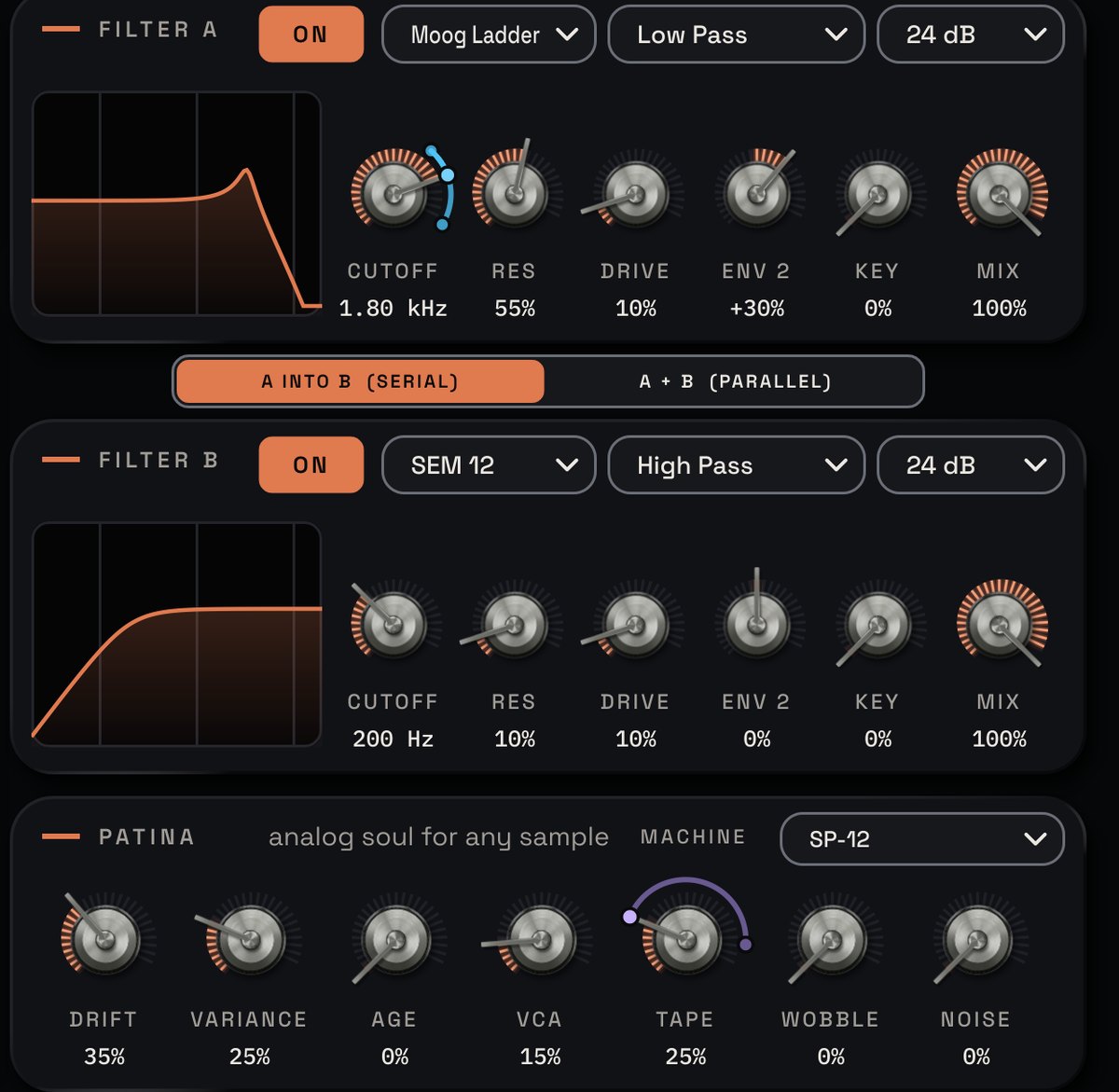
Make any sample sound analog.
Classic SEM, OB-X, ARP 4072 and Moog ladder filters, then PATINA: drift, old sampler converters, tape and wobble.
- 100 factory presets in 10 categories
- VST3, AU, CLAP and a standalone app
- Mac and Windows
- Help bar that explains every control
- Free updates for as long as you own it
Do I need my own samples?
TENFOLD is built around your sounds: drop audio files on the layer cards (several at once fill the next cards). The factory presets keep your samples and reshape the sound around them.
Will it stay in tune?
AUTO TUNE detects each sample's pitch and sets its root key and fine tuning for you.
Can it sound like an old sampler?
Yes. PATINA's AGE section models the converters of classic samplers, alongside drift, VCA, tape, wobble and noise.
| Formats | VST3, AU, CLAP and a standalone app |
|---|---|
| Systems | Mac (Apple Silicon and Intel) and Windows |
| Content | 100 factory presets in 10 categories |
| Your sounds | Load your own samples; TENFOLD never ships anyone else's library |
Strike it, bow it, let it ring. RESONA builds sound the way real instruments do. Something sets an object moving, and the object decides how it sounds: glass, wood, metal and strings that answer the way you play them. Five resonator models, from bells and marimbas to sympathetic strings and full chords.
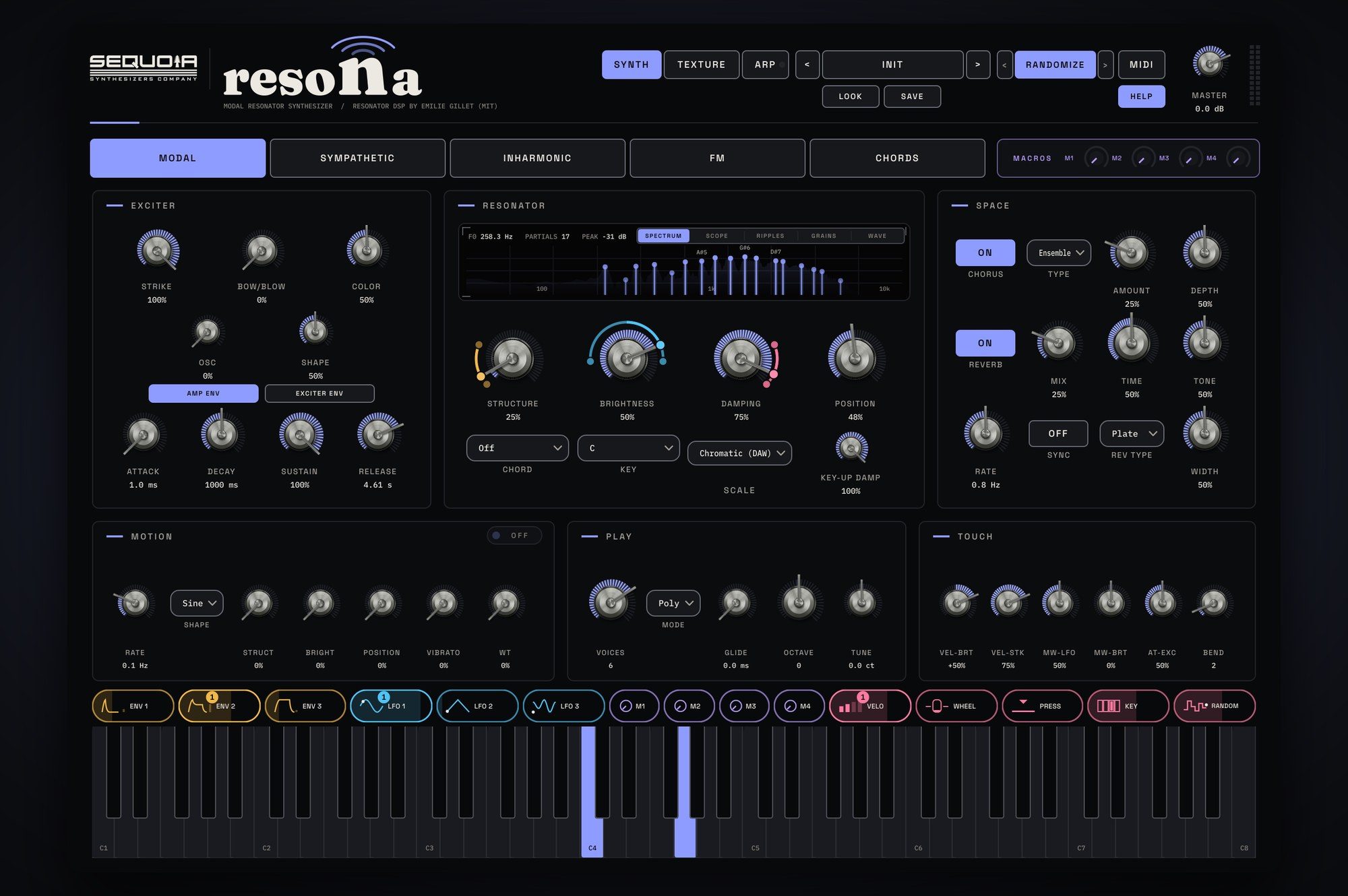
PLAY
69 factory sounds in nine categories, from mallets and bells to pads, drones and textures. RANDOMIZE rolls a new sound in one click, with BACK to every sound you had. Every note gets its own ringing object.
SHAPE
Pick one of five models, then four big knobs set the material, the brightness, how long it rings and where it's struck. Strike it, bow it, blow into it, or drive it with an oscillator, a wavetable or grains.
MOVE
Drag a CHIP, Sequoia's exclusive drag-and-drop modulation, onto any parameter: three envelopes, three LFOs, four macros, velocity, mod wheel and more. Map any controller with MIDI MAP. A 16-step arpeggiator follows your song.
Five models
- MODAL: bars, tubes, plates and bells
- SYMPATHETIC: a string with drone strings ringing alongside
- INHARMONIC: one stiff string, from harp to piano wire to metal
- FM: tines, electric pianos and bell stacks
- CHORDS: one key plays a full, ringing chord
Exciter
- STRIKE, BOW/BLOW and a tuned oscillator, mixed freely
- COLOR from soft breath to scratchy bow
- Separate AMP and EXCITER envelopes
Resonator
- STRUCTURE, BRIGHTNESS, DAMPING and POSITION
- KEY-UP DAMP decides what happens when you let go
- 13 chord types, plus diatonic triads and 7ths
- Snap to a scale in any key, or draw your own
Texture engines
- Wavetable: 30 tables, or import your own
- Granular: live grains of RESONA itself, or a sample you load
- Ring modulation that follows the note
- Envelope follower on twelve targets
Modulation & play
- Three AHDSR envelopes, three morphing LFOs, four macros
- CHIPS: exclusive drag-and-drop modulation onto any parameter, with live arcs
- Up to 8 keys (16 resonators with chords): poly, mono or legato, with glide
- MIDI MAP for any wheel, pedal or CC
- 16-step arpeggiator with velocity, gate, pitch, glide and pan lanes
Space
- CHORUS, ENSEMBLE or ping pong delay, with tempo sync
- SPACE hall or bright PLATE reverb
- WIDTH from mono to extra wide
- Five live displays: spectrum, scope, ripples, grains and wave
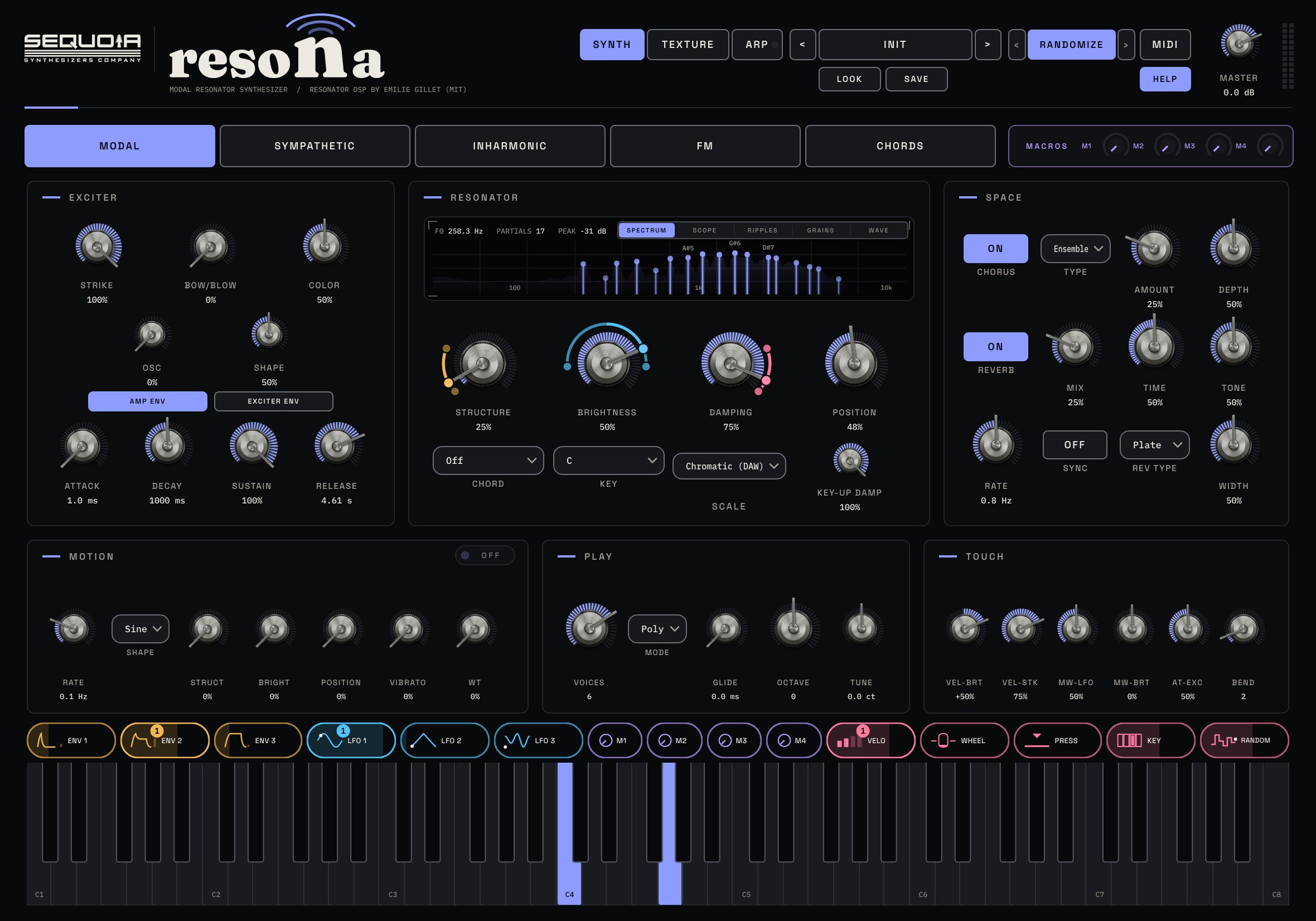
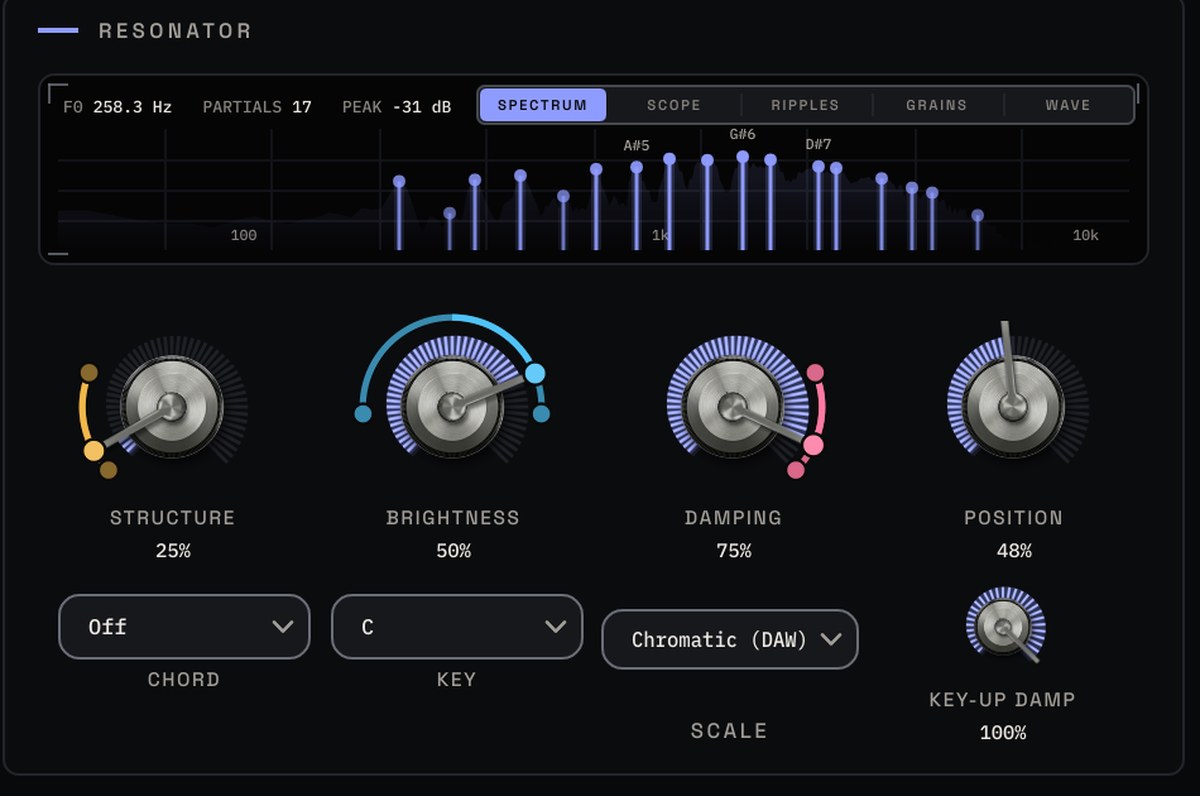
Four knobs. Any object.
STRUCTURE turns wood into glass and metal. BRIGHTNESS opens the top end, DAMPING sets how long it rings, POSITION moves where it's struck. Watch every partial ring out on the display above them.
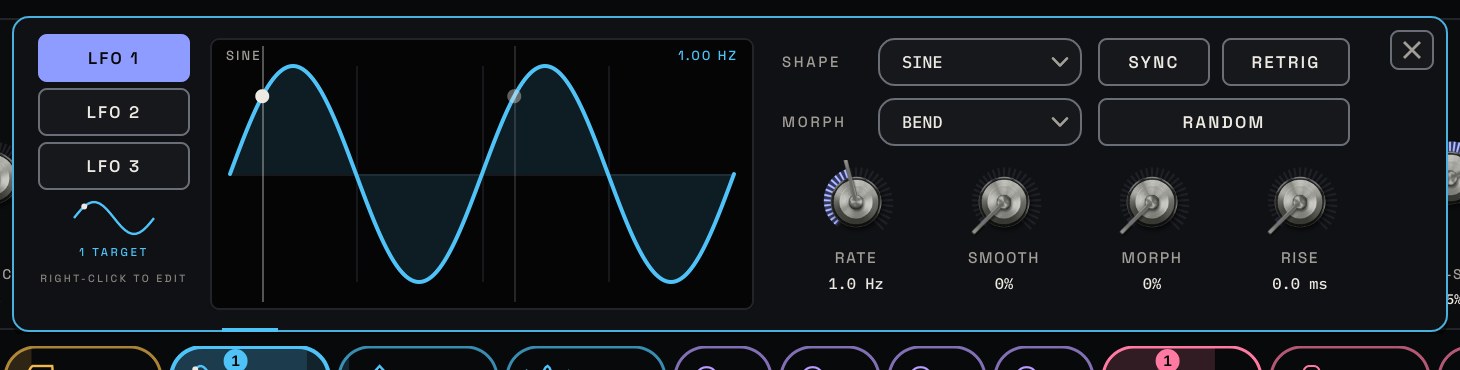
CHIPS: drag movement onto any parameter.
CHIPS are Sequoia's exclusive drag-and-drop modulation. Pick up an envelope, LFO, macro or your mod wheel and drop it on any parameter. Its arc shows exactly how far it moves, live, while you play.
- 69 factory presets in nine categories
- VST3, AU, CLAP and a standalone app
- Mac and Windows
- User manual, plus help tips on every control
- Free updates for as long as you own it
- WINDSHEAR digital pitch-shift pedal
- HOROCYCLE hyperbolic disk delay
- WINNOW song-to-sample-pack harvester
What is a modal resonator?
Instead of carving a waveform down, RESONA models objects that ring: bars, strings, plates and bells. You choose how they're played and what they're made of, and every note gets its own.
Can it play pads and drones, not just plucks and bells?
Yes. Turn up BOW/BLOW or the oscillator and the object keeps singing while you hold a key. Add the granular engine for long, evolving textures.
Will my MIDI controller work?
Yes. Open MIDI MAP, pick a wheel, pedal or any CC (or press LEARN and move a knob), then add every control it should move.
Can I change how RESONA looks?
Yes. Press LOOK to switch between the dark STAGE and light STUDIO panels and pick your own signal colour.
| Formats | VST3, AU, CLAP and a standalone app |
|---|---|
| Mac | macOS 10.15 or later, Apple Silicon and Intel |
| Windows | Windows 10 or 11, 64-bit |
| Voices | Up to 8 keys (16 resonators with chords), poly / mono / legato |
| Models | Modal, Sympathetic, Inharmonic, FM and Chords |
| Looks | STAGE and STUDIO, with a choice of signal colours |
| Content | 69 factory presets in nine categories, 30 wavetables |
| Manual | Read it online |
Wear it in, not out. Tape, vintage samplers and vinyl, tuned to give any sound character without losing its clarity. One AGE knob takes it from pristine to dust, with a live granular engine underneath.
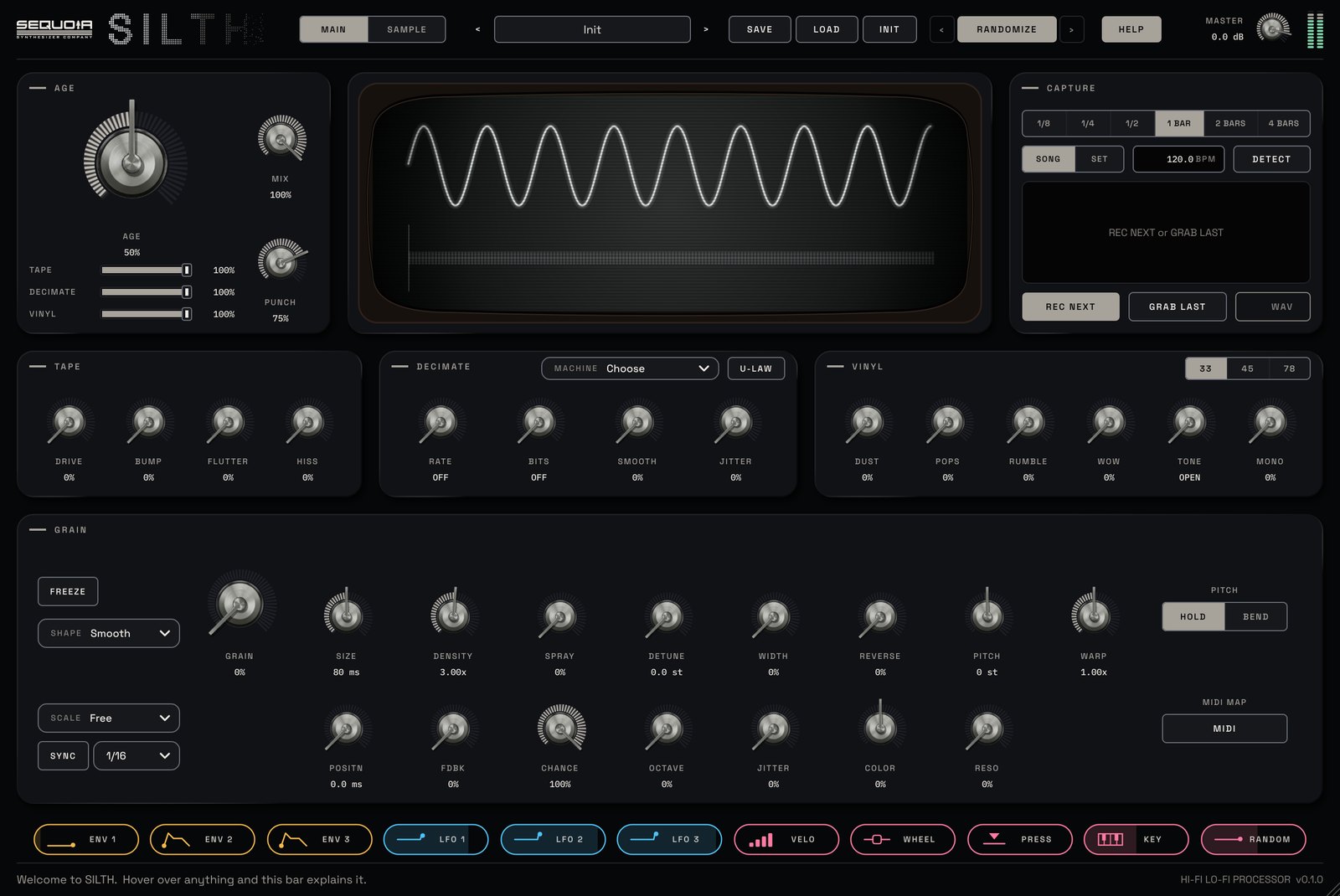
PLAY
60 factory presets in six folders: Dusted, Sampler, Tape, Grain, Warp and Signal Loss. One AGE knob from clean to fully aged.
SHAPE
TAPE, DECIMATE and VINYL sections, each with its own share of AGE, and TENFOLD's granular engine running live on whatever comes in.
MOVE
Eleven modulation chips, envelopes that can trigger on every hit of the incoming sound, and MIDI MAP for any controller.
AGE
- One knob drives tape, decimate and vinyl together
- TAPE / CRUSH / VINYL sliders set how much each section ages
- MIX for parallel processing
Tape, decimate, vinyl
- Tape drive, head bump, flutter and hiss
- Sample rate, bits, smoothing, clock jitter, u-law
- MACHINE: a classic sampler in one click
- Dust, pops, rumble, wow, tone, mono lows, 33 / 45 / 78
- All noise follows the sound, so silence stays silent
Grain
- Size, density, spray, detune, width, reverse, pitch
- WARP with PITCH HOLD or BEND
- FREEZE, feedback, chance, octave jumps
- Grain colour filter, scale snap and tempo sync
Capture & print
- CAPTURE records what SILTH plays, 1/8 bar to 4 bars
- GRAB LAST keeps what just played: it is always listening
- DETECT finds the BPM of the incoming sound
- SAMPLE page: run a file through SILTH and print it as a seamless loop
Screen & modulation
- A bubble-TV screen shows the sound in and out, and every live grain
- ENV 1-3, LFO 1-3, VELO, WHEEL, PRESS, KEY, RANDOM
- Envelopes trigger on notes, beats, bars or the input itself
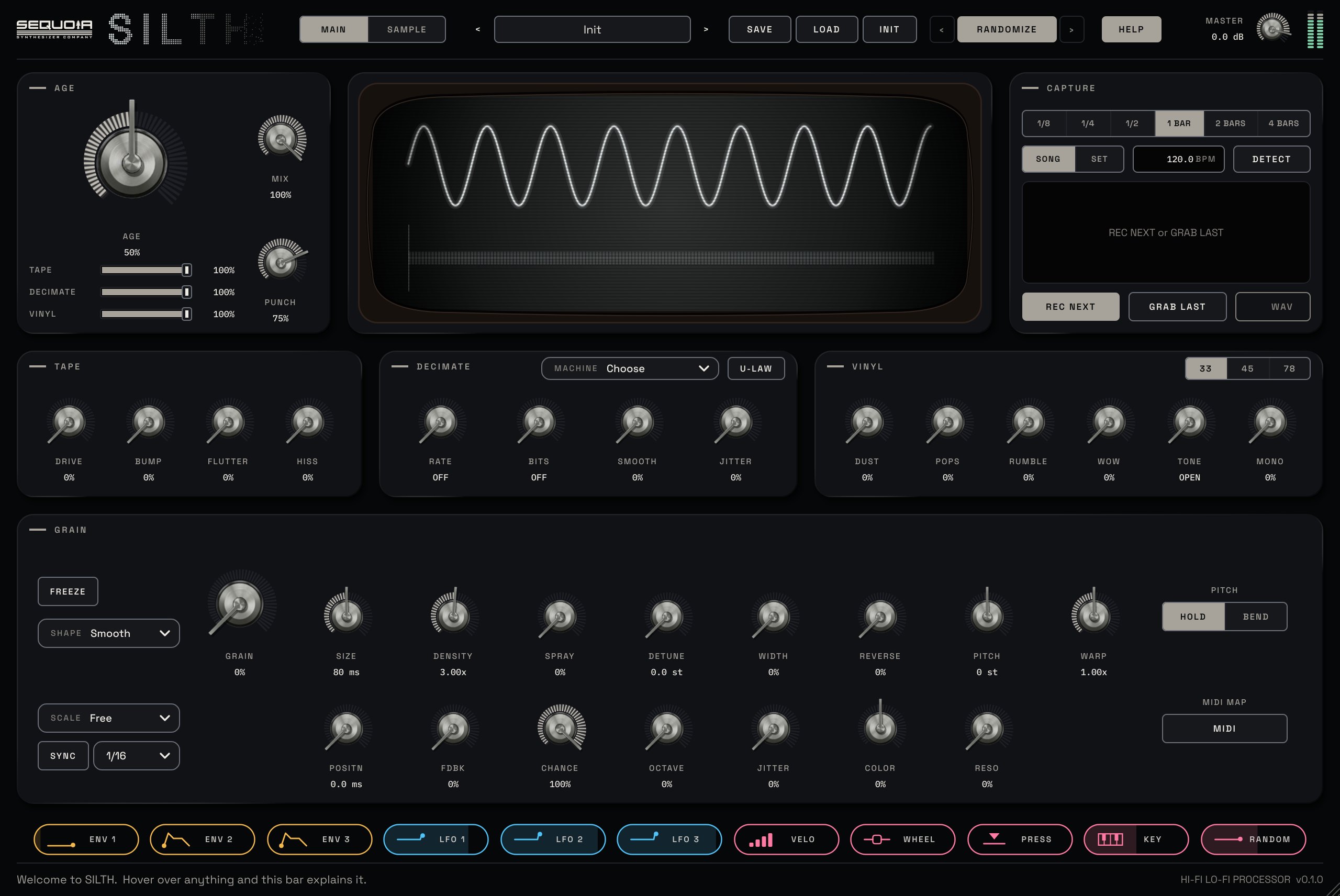
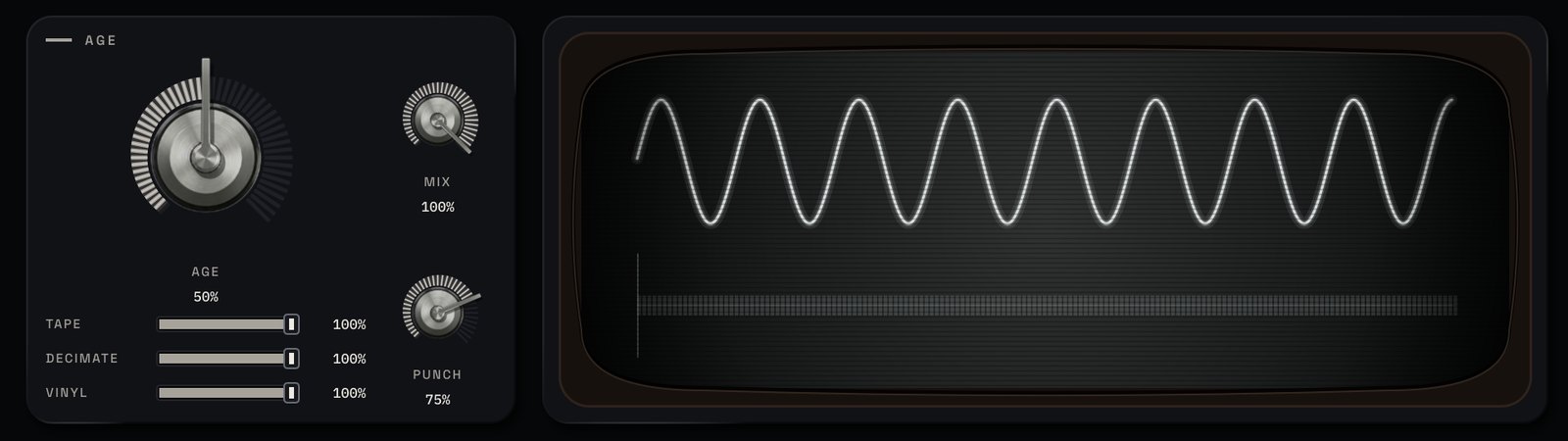
One knob. Decades of wear.
Turn AGE and your sound picks up tape, old converters and vinyl at once. Then CAPTURE a bar and drag it into your song.
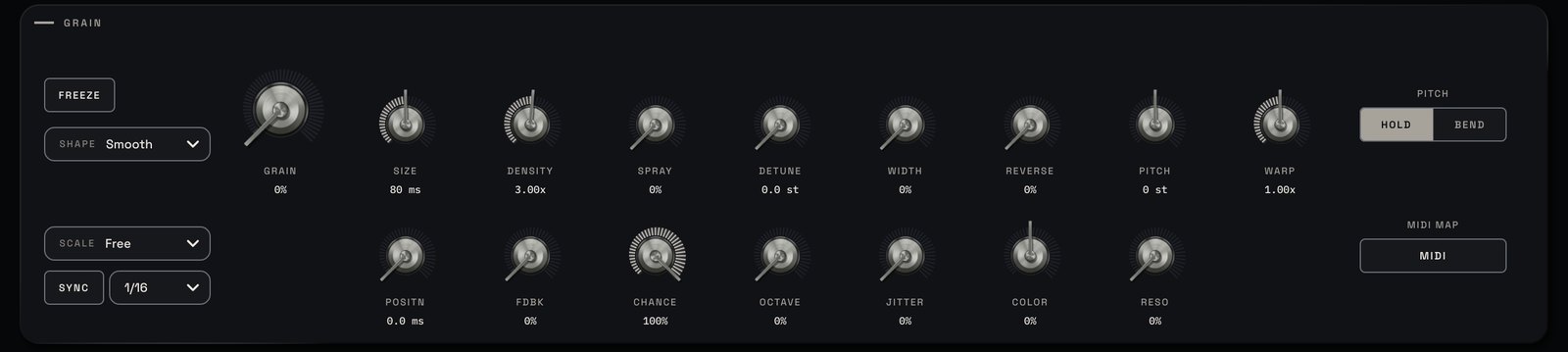
Break it into grains.
FREEZE a moment, stretch it out or scatter it, locked to your song's tempo and scale.
- Factory presets for drums, keys and vocals
- VST3, AU and CLAP
- Mac and Windows
- Help bar that explains every control
- Free updates for as long as you own it
Will it ruin my sound?
No. AGE starts clean at 0%, and the TAPE, CRUSH and VINYL sliders let you keep any section cleaner while the others age. MIX blends in the dry signal.
Can I get the result into my DAW as audio?
Yes. CAPTURE records what SILTH plays and you drag the WAV straight onto a track. The SAMPLE page prints whole files, or seamless loops.
Can I control it from a keyboard?
Yes, with MIDI MAP. Send your controller's MIDI to SILTH's track; some DAWs don't pass MIDI to audio effects.
| Formats | VST3, AU and CLAP |
|---|---|
| Systems | Mac (Apple Silicon and Intel) and Windows |
| Type | Audio effect |
| Content | 60 factory presets in six folders |
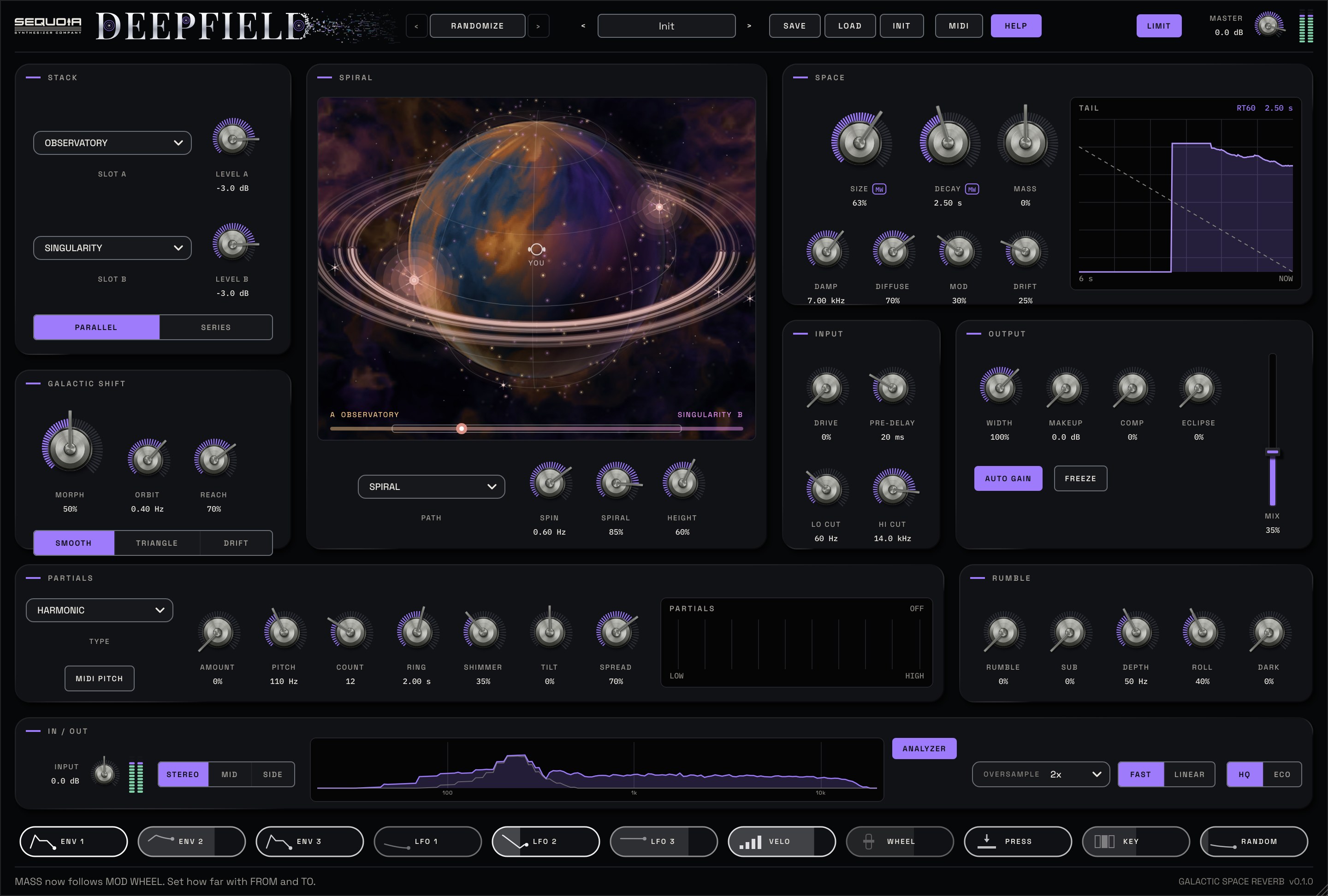
Reverb as big as the night sky. Stack two of twelve reverb engines, from a realistic hall to a dark singularity and three vast, velvet-smooth spaces, then drift between them and send the tail spiralling around you. Tuned partials ring out of the tail, and RUMBLE adds distant thunder underneath.
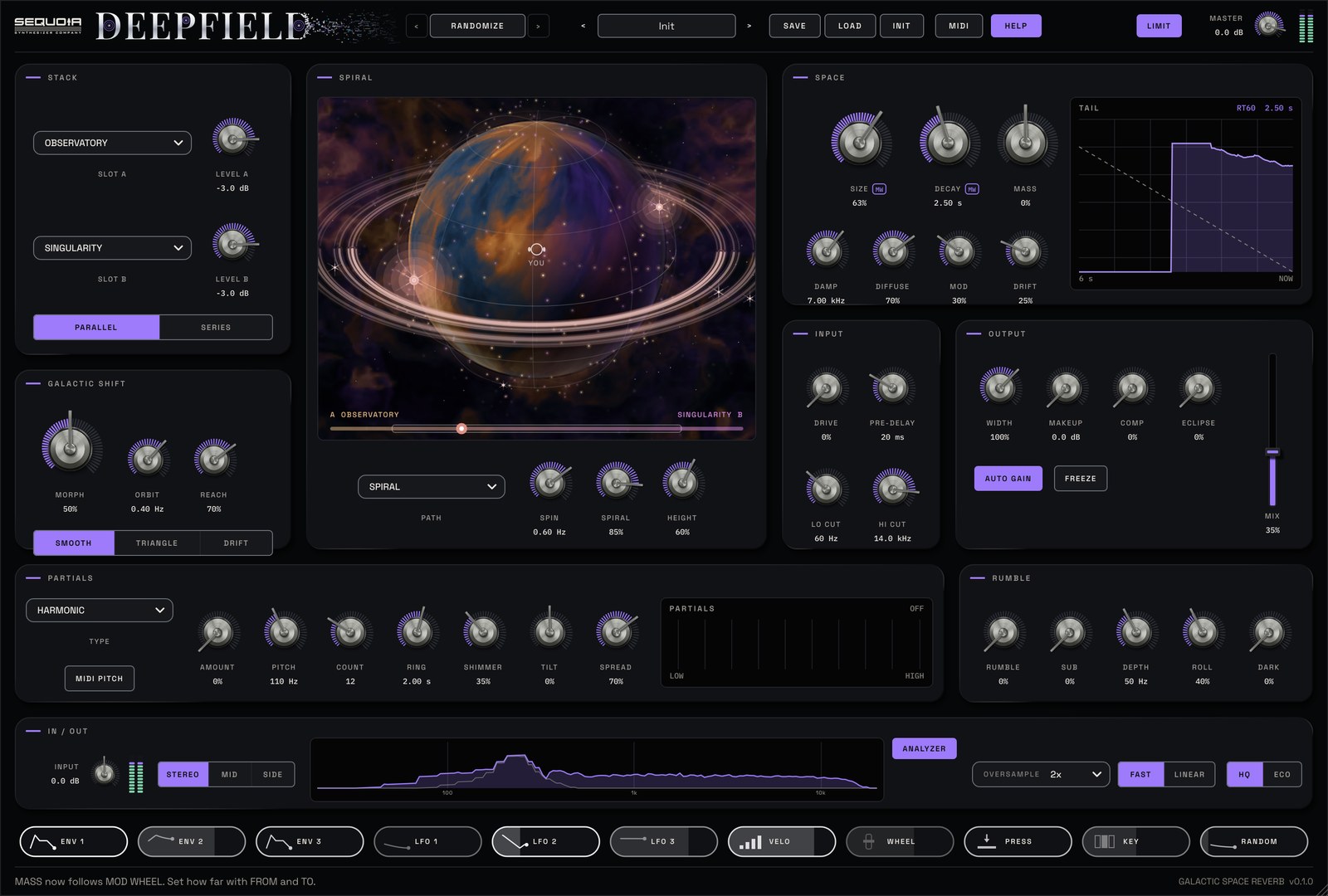
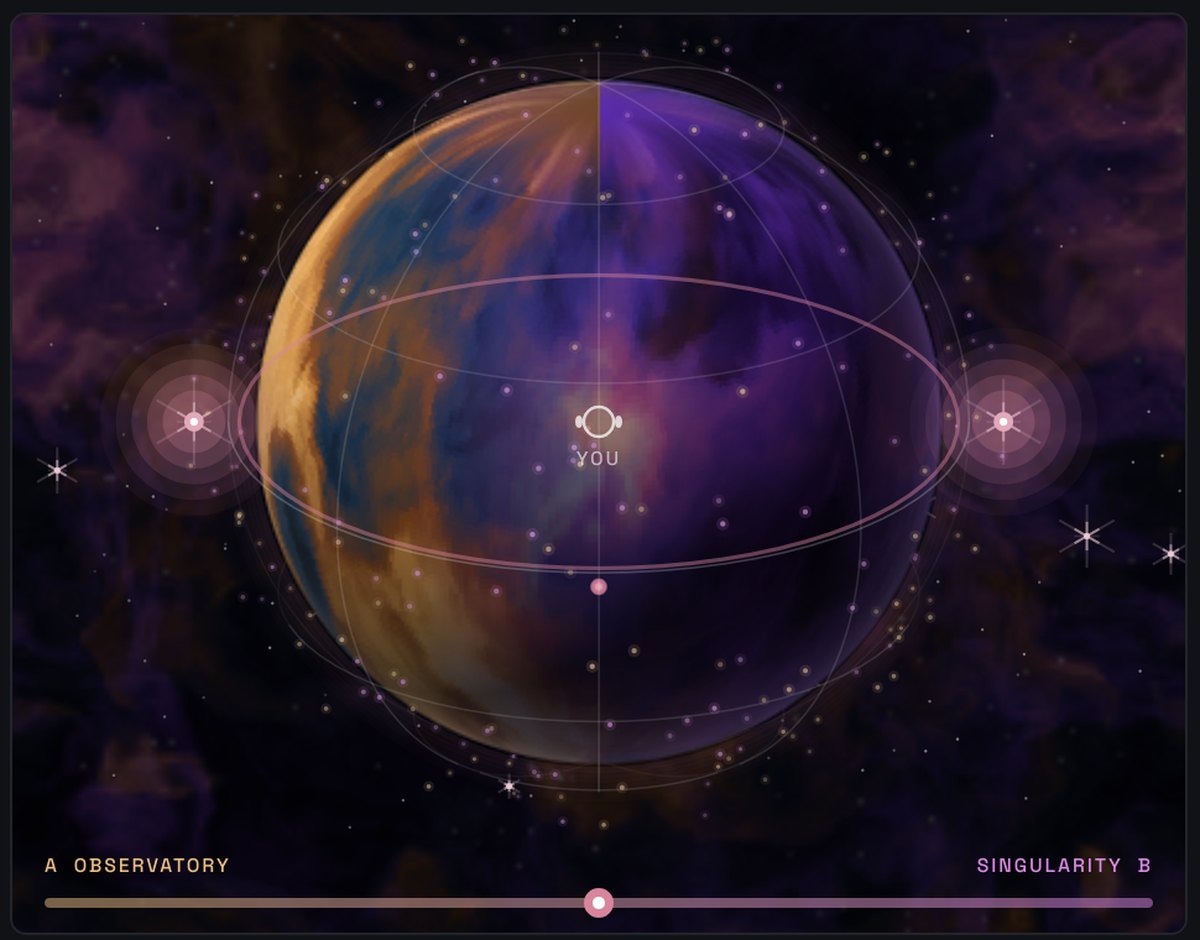
Steer the space around you.
MORPH drifts between the two engines, each drawn as its own nebula. SPIRAL sends the tail round a sphere: left, right, behind you, over and under. Best on headphones.

The reverb sings.
Tuned partials ring out of the tail. Turn on MIDI PITCH and they follow the notes you play.
PLAY
67 factory presets. Pick two engines, set SIZE and DECAY, and FREEZE any moment to hold it forever. AUTO GAIN keeps the tail at a steady level next to your sound.
SHAPE
Twelve engines, each bent its own way by MASS. Run them in PARALLEL or SERIES, shape the input with DRIVE, PRE-DELAY and cut filters, and darken the whole space with RUMBLE.
MOVE
GALACTIC SHIFT drifts between the engines on its own. SPIRAL moves the tail through space. Drag CHIPS, our exclusive drag-and-drop modulation, onto any parameter, and map any controller with MIDI MAP.
Twelve engines
- SINGULARITY, OBSERVATORY, CORONAL PLATE
- DRIFT FIELD, PROTOSTAR, PULSAR
- MAGNETAR springs, ORBIT 78 rack digital, REDSHIFT
- EVENT HORIZON, AURORA, ANDROMEDA: huge and smooth, with nothing grainy in them
- MASS bends each engine its own way
The stack
- Two engine slots, each with its own level
- PARALLEL or SERIES
- MORPH between them by hand, or let it drift at any SPEED
Space
- SIZE, DECAY, DAMP, DIFFUSE, MOD and DRIFT
- SPIRAL, HALO, FIGURE 8 and COMET paths
- FREEZE holds the tail forever
Partials
- 4 to 32 tuned partials ring out of the tail
- HARMONIC, ODD, BELL, GLASS, CHORD, NEBULA
- MIDI PITCH: the reverb sings what you play
- Turn it up and the whole space rings in tune
Rumble
- A deep growl that follows the reverb
- SUB adds an octave below
- Never pushes your mix into clipping
Level & control
- MAKEUP up to +24 dB and AUTO GAIN
- ENV and LFO chips that trigger from your input
- MIDI MAP for any controller
- 67 factory presets
- VST3, AU and CLAP
- Mac and Windows
- Help bar that explains every control
- Free updates for as long as you own it
Is it only for huge spaces?
No. OBSERVATORY is a realistic hall, CORONAL PLATE a bright plate and MAGNETAR a spring tank. Turn SIZE down and DEEPFIELD sits just as well on a vocal or a snare.
Why is my reverb quieter than my dry sound?
Reverbs spread their energy out. Leave AUTO GAIN on to keep the tail at a steady level, or add up to +24 dB with MAKEUP.
Do I need headphones for SPIRAL?
No, but it's at its best on them. On speakers, low settings simply turn the stereo image gently.
| Formats | Mac: VST3, AU, AUv3 and CLAP · Windows: VST3 and CLAP |
|---|---|
| Systems | Mac (Apple Silicon and Intel) and Windows |
| Type | Audio effect |
| Engines | 12, two at a time |
| CPU | Light: about 4% of one core while playing, almost nothing in silence, ECO mode for older computers |
| Window | Resizable, with a tall layout for narrow windows |
| Content | 67 factory presets |
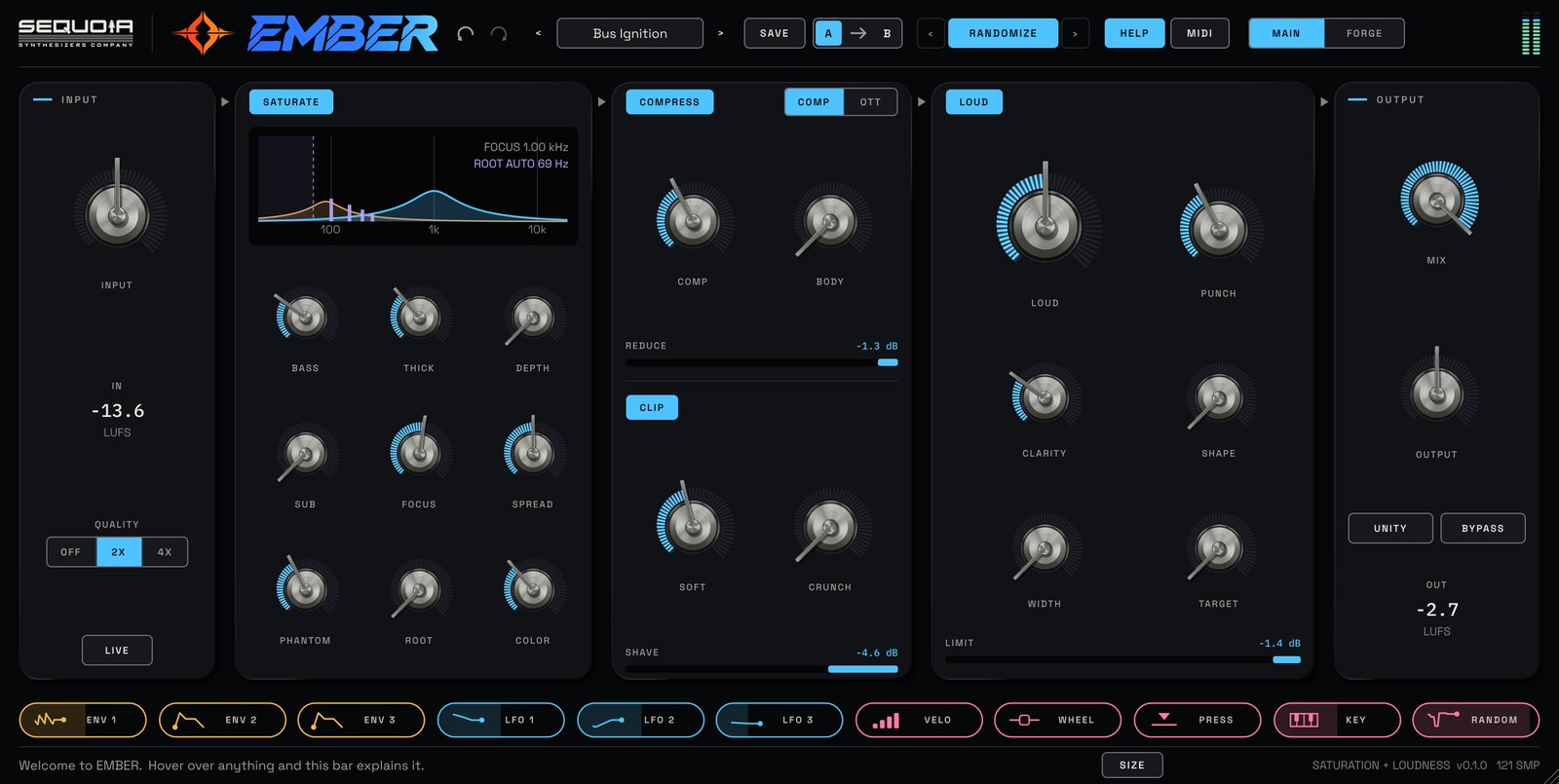
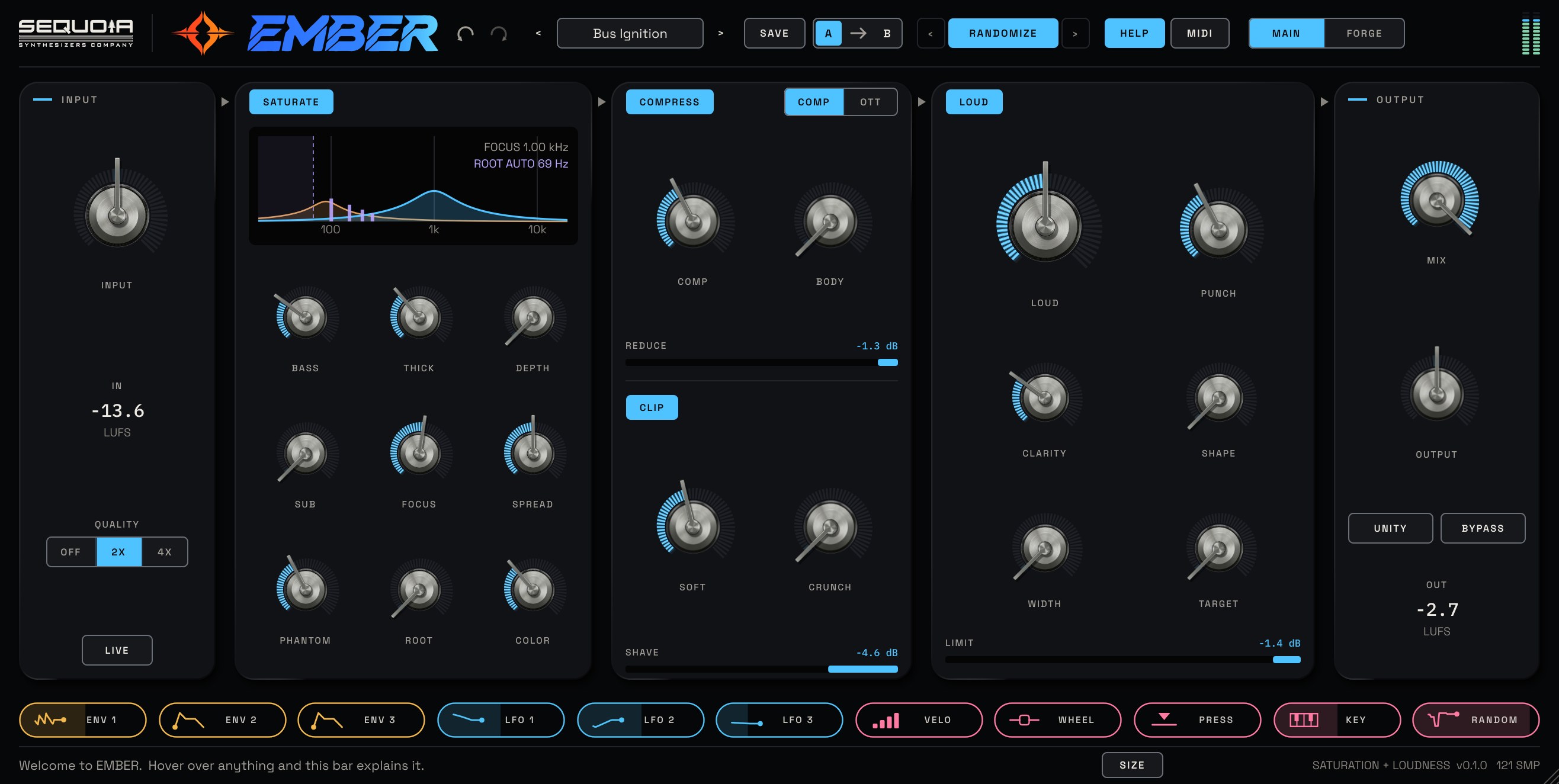
Bigger, warmer, louder. Never over the line. EMBER saturates, compresses, clips and lifts the level up to a ceiling just under 0 dB, with the hits still hitting and the sub still clean. PHANTOM makes your bass heard even on a phone, and the FORGE page lets you fire up four bands on their own.
Bass you hear on a phone.
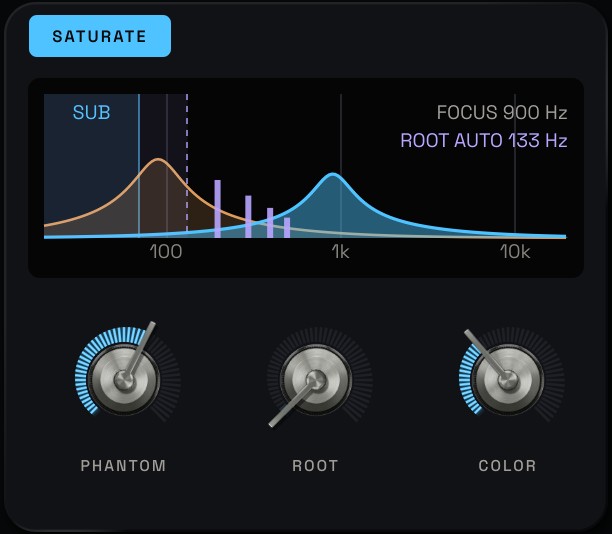
PHANTOM adds the harmonics your ear uses to fill in a bass note, so the low end comes through on phones, laptops and earbuds that can't play it. ROOT AUTO finds your bass note by itself, so you just turn it up.

Draw where the heat goes.
FORGE splits the sound into COALS, FLAME, SPARK and SMOKE. Give each band its own heat, snap, echo, room and width, or draw TONE, HEAT and WIDTH curves right across the spectrum.
HEAT
58 factory presets. BASS for weight, THICK for warmth, DEPTH for deepness. SUB keeps everything below it clean, FOCUS and SPREAD place the new harmonics, and PHANTOM makes the bass carry.
PUNCH
COMP or OTT to hold it together and BODY to bring up the detail. SOFT rounds the peaks and CRUNCH adds edge. PUNCH keeps the drums hitting when you go loud.
LEVEL
LOUD lifts everything to a ceiling just under 0 dB. CLARITY stops the pumping, SHAPE sets the character and TARGET finds a loudness by itself. UNITY lets you hear the tone, not just the level.
Saturate
- BASS, THICK and DEPTH
- SUB keeps the low end clean and deep
- FOCUS and SPREAD place the new harmonics
- A display that shows every knob as you turn it
Phantom
- The missing-fundamental effect, for bass on small speakers
- ROOT AUTO follows your bass note like a tuner
- COLOR from warm and round to bright and edgy
- Added in mono, so the bass stays solid
Compress and clip
- COMP for smooth glue, OTT for three-band squash
- BODY lifts tails, room and detail
- SOFT and CRUNCH for rounded peaks and edge
Loud
- A ceiling at −0.3 dBFS that nothing gets past
- PUNCH, CLARITY, SHAPE and WIDTH
- TARGET: −14 for streaming, −9 loud, −7 club
- UNITY and BYPASS to compare fairly
FORGE
- Four bands: COALS, FLAME, SPARK, SMOKE
- HEAT on TUBE, IRON or WIRE, SNAP, TRAIL, HALO and SPAN on each
- LISTEN places the splits from your drums
- Draw TONE, HEAT and WIDTH curves
Control
- CHIPS: drag-and-drop modulation from 11 sources
- MIDI MAP for any controller
- A / B, 100 undo steps and RANDOMIZE
- QUALITY up to 4X and a LIVE low-latency mode
- 58 factory presets
- VST3, AU and CLAP
- Mac and Windows
- Help bar that explains every control
- Free updates for as long as you own it
Will EMBER change my sound as soon as I load it?
No. At its defaults it doesn't change the sound at all. Turn up LOUD, then add colour with BASS, THICK and SOFT, or start from one of the 58 presets.
Can it push my master over 0 dB?
No. With LOUD on, the ceiling comes last, after MIX and OUTPUT, so nothing EMBER sends out goes over −0.3 dBFS.
It's louder, but is it better?
Press UNITY. EMBER plays the processed sound at the same loudness as the original, so you hear the change in tone, not just more level.
What does PHANTOM do?
It adds the harmonics of your bass just above it. Your ear fills in the deep note from them, so the bass is heard even on speakers that can't play it. Leave ROOT on AUTO and just turn PHANTOM up.
| Formats | Mac: VST3, AU and CLAP · Windows: VST3 and CLAP |
|---|---|
| Systems | Mac (Apple Silicon and Intel) and Windows |
| Type | Audio effect, mono or stereo |
| Quality | Saturation and clipping at 1x, 2x or 4x the sample rate |
| Latency | 1.5 ms look-ahead, reported to your DAW; LIVE mode for a few samples |
| Window | Resizable, SMALL to EXTRA LARGE or FIT TO SCREEN |
| Content | 58 factory presets in 11 folders |
Sounds that start the track.
Every factory sound is designed for its instrument, never borrowed from a pack. More expansions are on the way.
Heard by producers first.
What the people testing the first release are saying.
Learn it in minutes. Explore it for years.
Quick tips, deep dives and live sessions for every instrument.
Real gear is on the way.
We're building hardware next, starting with Eurorack. The same way of playing, in your rack. Stay tuned.
Get it, install it, keep it current.
Find a retailer
Buy here, or from the stores you already use.
Installers
Mac and Windows installers for every plugin you own.
Release notes
What changed in each version.
Sequoia Synthesizers Co makes instruments for people who want to play their sound, not just program it.
Every instrument is built around one idea: software should respond like hardware. Turn a knob and hear it move. Drag CHIPS, our exclusive drag-and-drop modulation, onto any parameter. Plug in a controller and it simply works.
One look and one way of working across the whole range: dark panels, one signal colour per instrument, every value in view. Learn it once, use it everywhere.
Want to review or play a Sequoia instrument?
Reviewers, YouTubers, sound designers and artists can ask for a free NFR (Not For Resale) copy: the full version, every feature and preset, free updates, licensed to you personally. Tell us your name, your channel or outlet, and which instrument.