How to make bass heard on phones and small speakers
Small speakers can't play deep bass, but your ear can still hear it. Here's how to use the missing fundamental so your low end comes through everywhere.
Why bass disappears on small speakers
A phone, a laptop or a pair of earbuds can't play much below 100 to 150 Hz. A kick, an 808 or a sub bass that sounds huge on studio monitors can simply vanish there. Turning the bass up doesn't help: the speaker still can't play it, and the mix just gets heavier on the systems that can.
The missing fundamental
Your ear doesn't need the deep note itself. When it hears a run of harmonics at two, three, four and five times a note's frequency, it fills in the note they belong to, even when that note isn't there. That's the missing fundamental. Add those harmonics just above your bass and it reads at full depth on a phone, while big speakers gain weight and definition.
Turn up PHANTOM
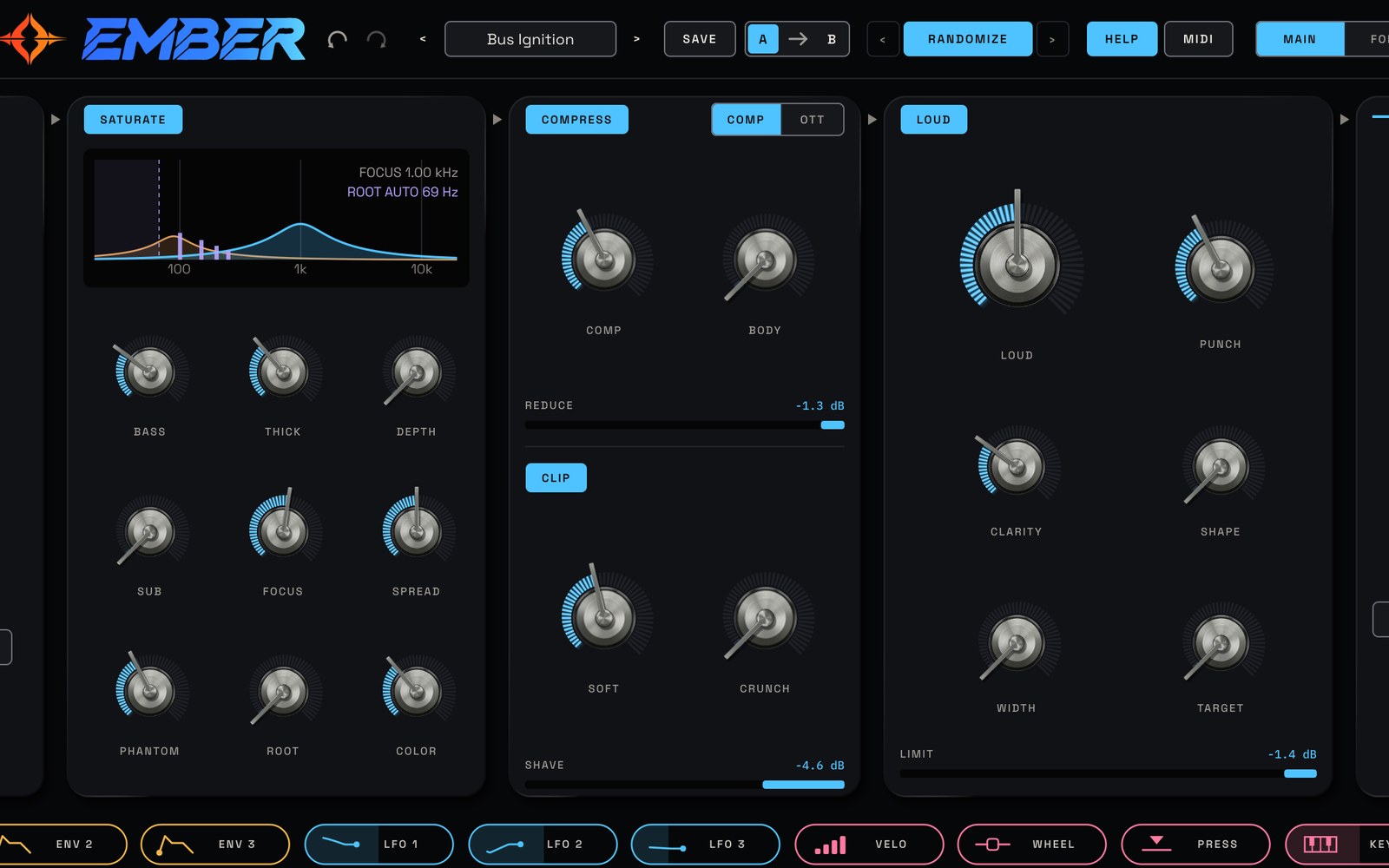
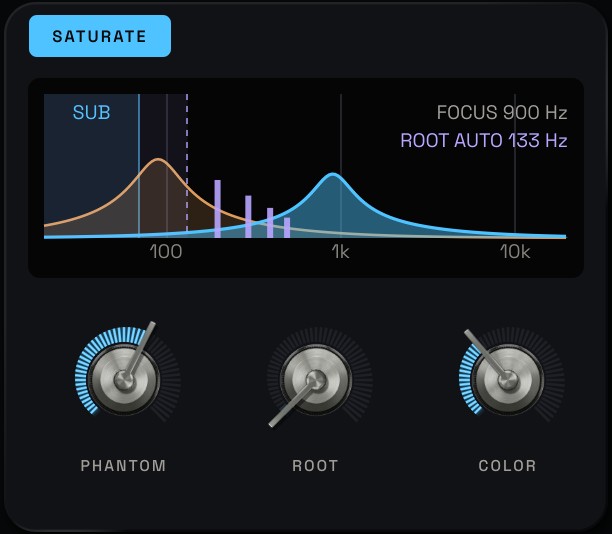
EMBER's PHANTOM does this for you. It sits in the SATURATE stage, so make sure SATURATE is lit.
- PHANTOM: how much of the harmonics goes in. 30 to 60% is plenty for most mixes.
- ROOT: leave it all the way down on AUTO. EMBER listens to your bass, finds its note like a tuner does, and keeps ROOT just above it as the bass line moves. To set it by hand, put it just above your bass or kick's main note, around 80 to 120 Hz for most bass.
- COLOR: low is warm and round (even harmonics), high is bright and edgy (odd harmonics) and cuts through a busy mix.
The harmonics follow the bass's pitch and level by themselves, and they're added in mono, so the low end stays solid in mono too. On the display, the dashed line is ROOT and the lilac lines are the harmonics PHANTOM adds.
Keep the sub clean
Set SUB to about 60 to 90 Hz. Everything below it goes round the saturation, compression and clipping untouched, so the deepest part of the bass stays clean on the systems that can play it. Then add BASS for extra weight and its own harmonics.
A recipe to start from
From the EMBER manual, an 808 that reads on a phone: SUB around 70 Hz, BASS 70%, THICK 45%, FOCUS around 900 Hz, SPREAD 25% and LOUD 40%. Add PHANTOM 40% with ROOT on AUTO. The factory preset Small Speaker Bass in the Low End folder is a good starting point too.
Check it the fair way
More harmonics also means more level, and louder always sounds better at first. Press UNITY to hear the processed sound at the same loudness as the original, so you judge the change in tone. Then listen on a phone or a laptop: the bass line should now be easy to follow.
Questions
Why can't I hear my bass on my phone?
Phone speakers can't play much below 100 to 150 Hz, so a deep kick or sub bass simply isn't reproduced. Adding its harmonics above that range lets your ear fill in the missing note.
Does adding harmonics hurt the mix in mono?
Not with PHANTOM: the harmonics are added in mono, so the low end stays solid when the mix is summed to mono.
Try it with EMBER
Saturation and loudness plugin for mixing and mastering. See EMBER →
$7935% off for the sign-up list at launchStore links and the 14-day free trial go live at launch. The trial just needs a free Sequoia account.