Mastering EQ for techno: a practical guide
Techno lives and dies on its low end and its hats. A mastering EQ should keep the kick and sub solid on a big system, take the edge off harsh moments and leave the groove untouched. Here is a simple order of work.
1. Listen at the same loudness
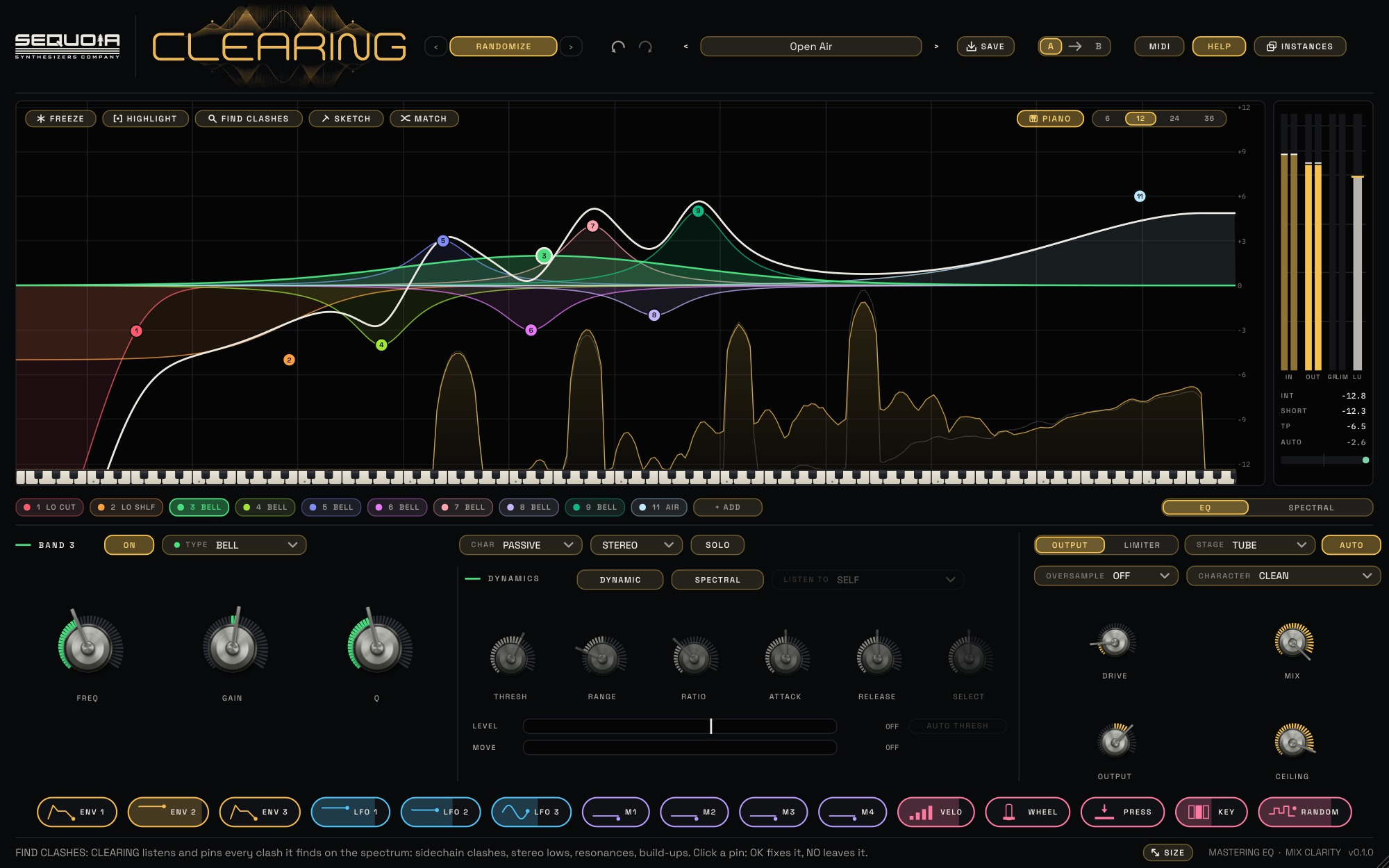
Every EQ move changes the level a little, and louder always sounds better. In CLEARING, turn on AUTO in the output section: it keeps the loudness steady while you EQ, so you judge the tone and not the volume. Use A / B to compare your setting with the untouched mix.
2. Clean and centre the low end
Start with a LOW CUT at 20 to 30 Hz to remove rumble you can't hear but your limiter can. Then add a second LOW CUT set to SIDE at 100 to 150 Hz. That makes everything below it mono, so the kick and sub hit the same way on a club system as on headphones. Watch the stereo correlation meter stay to the right of centre.
3. Shape the weight with broad moves
Mastering EQ is about gentle, wide curves. A LOW SHELF of about +1 dB with the PASSIVE character gives the classic broad lift with a slight dip above it, which keeps the low mids from getting thick. If the track feels dull, an AIR band around 16 kHz at +1 to +2 dB opens the top without making the hats louder.
4. Tame harsh hats and ringing synths only when they happen
A fixed cut at 3 to 6 kHz dulls the whole track. Instead, make the band DYNAMIC: it only dips when that area gets louder than usual. With AUTO THRESH on, the band follows the track's own level and reacts only to what stands out. For a single ringing synth note, turn on SPECTRAL and the band dips just the narrow peaks inside its range.
5. Let the plugin point at problems
Press FIND CLASHES while the drop plays. CLEARING checks the whole spectrum and pins up to five spots: stereo lows, resonances and build-ups. Click a pin, press LISTEN to hear only that area, then OK to add the suggested fix as a normal band you can fine-tune.
6. Finish with colour and a safe ceiling
Set STAGE to TUBE or IRON with a little DRIVE for density, then turn on SAFE so no peak passes the CEILING. Check integrated loudness and true peak on the meter bar before you bounce.
The Mastering Polish recipe in the CLEARING manual sums it up: low cut at 20 to 30 Hz, low shelf +1 dB passive, air at 16 kHz +2 dB, tube stage, a little drive and AUTO on.