How to remove mud from a mix
Mud is the woolly, crowded sound that builds up when several instruments pile energy into the low mids, roughly 200 to 500 Hz. Cut too much and the mix goes thin. The trick is to find the exact spot and cut only when it gets thick.

Why mixes get muddy
Pads, bass, the body of a kick, guitars, piano and vocals all have energy in the low mids. Each one sounds fine alone, but together they stack into a build-up that masks detail. Mud is rarely one sound's fault, so the fix is usually a small cut in the right place on the right track or bus.
Find the build-up
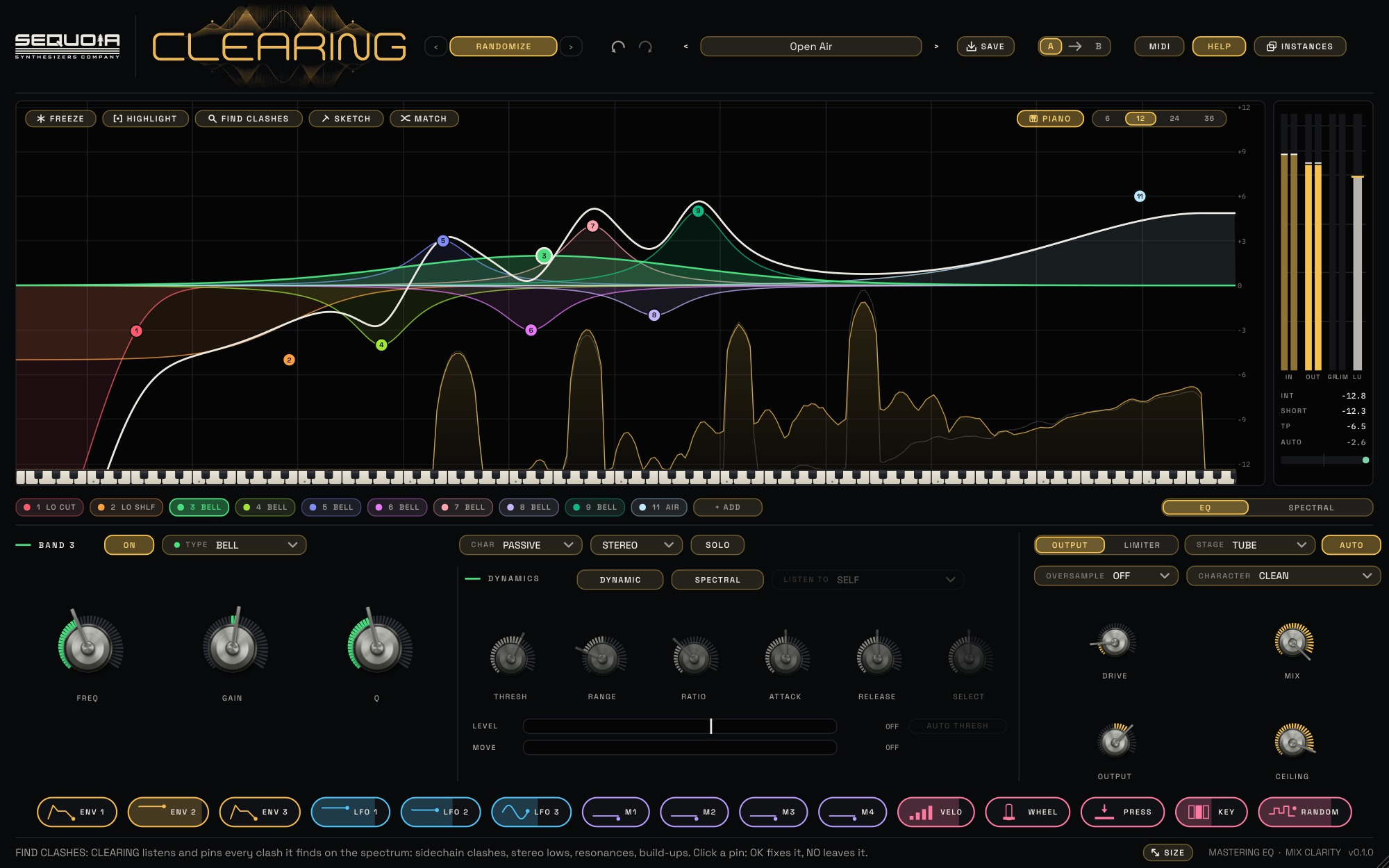
Put CLEARING on the mix bus or on the busiest group and play the thickest part of the song. Press FREEZE at a moment that sounds crowded so the spectrum holds still. Then press HIGHLIGHT and drag across the area that sounds woolly. A card names what CLEARING found there, a build-up or a resonance, and the fix it suggests. Press LISTEN to hear only that slice of the spectrum, so you know you have the right spot.
Cut it dynamically
Press OK and CLEARING adds the fix as a normal band. For a build-up that is a broad DYNAMIC cut: it eases the area back only when it gets thick, then lets go. Quiet parts keep their warmth and the busy chorus stops clouding over. Adjust RANGE to set the most it can cut and RATIO for how strongly it reacts. The LEVEL and MOVE meters under the knobs show what the band hears and how far it is moving.
Or draw the curve
If you already know the shape you want, press SKETCH and draw a gentle dip across the low mids in one stroke. CLEARING places bells that follow your line, ready to fine-tune. Another quick way: move the mouse along the spectrum, click the peak marked by the ring and drag down. The band lands exactly on the peak, as narrow as the peak is.
Check the result
- Turn on AUTO so the cut does not just sound quieter.
- Use A / B to compare before and after.
- Keep the cut small, usually 1 to 4 dB. If you need more, fix the arrangement or the individual track instead.
- Choose the CLEAN character for transparent cuts; PASSIVE gives a broader, smoother curve.
The Mix Bus presets in CLEARING include mud removal starting points, tagged so you can find them in the preset browser.